Protected Audience API (formerly FLEDGE) in Privacy Sandbox on Android: reinventing the mobile ad network?

How will Google’s new Protected Audience API work in Privacy Sandbox on Android? And how will an ad go from an advertiser through a publisher to a person? If Google’s privacy plans come to fruition, that flow is going to change significantly on the world’s most popular computing platform in less than two years. 

When Apple introduced SKAdNetwork to iOS in 2021, it changed the privacy narrative on the planet’s most profitable mobile platform. Privacy Sandbox on Android is largely seen as Google’s answer, but the technology that Google is building into PSA goes far beyond privacy. There are significant changes to how mobile SDKs operate, major upheaval to how advertisers target audiences, and huge transformation in how attribution will work after the GAID is retired from service.

But there’s also a massive transition in store for mobile ad networks, and how an ad leaves an advertiser’s digital fingers on a long winding path to a human’s eyeballs.

Today we’re going to dig into exactly that part.


This post is part of an ongoing series on Privacy Sandbox:

  • SDK Runtime (how Google is sandboxing SDKs)
  • Topics API (how Google sees ad targeting working)
  • Protected Audiences API on Android (this post on how Privacy Sandbox will do audiences and remarketing)
  • Attribution Reporting API (how Google is proposing ad measurement will work)

The big change: the ad network now lives in your app

We’ve had mediation and app bidding and monetization capabilities in apps for some time now. So building ad network functionality into our mobile devices is nothing new. But Privacy Sandbox on Android signals a major shift in how that works. And in what is actually happening.

  • What data goes where
  • Who gets access to information
  • Where the ad auction actually takes place
  • And much more …

In traditional (as in: current) ad targeting, auctioning, and serving environments within most apps, ads come to our mobile devices, generally speaking, in one of two ways:

  • App bidding (header bidding)
  • Ad waterfall

In a waterfall world, an app looking to fill an ad request goes to a sequential list of preferred ad networks looking to fill the slot. The first one that says yes — with a presumably competitive bid but not one that is guaranteed to be the highest — wins and fills the slot with an ad. In an app bidding world, there’s a real-time auction between multiple ad networks and demand-side platforms simultaneously: everyone gets a crack at the slot, and the highest bidder wins. 

While the ad fill request is initiated from within a publisher’s app, the actual auction generally takes place on an ad server (in some cases the publisher’s own), and the data informing each player bidding on each ad is generally sent to additional servers owned or used by those companies. There it can be enriched with additional data that helps ad networks value the impression appropriately and guides both the types of ads they feel would be appropriate for that slot and their bidding strategy: specifically the price they’re willing to pay for that impression.

So today, a lot of the mobile advertising ecosystem that both compensates developers/publishers and drives growth and user/customer acquisition happens off-device and involves a lot of data that is sent, managed, processed, and stored in multiple companies’ cloud systems.

A lot of this changes in Protected Audiences API

First off, at least some ads will be stored on device and periodically fetched in the background. There is an endpoint defined in the code for rendering creative, so presumably at least some parts of the ads and/or creative can also be streamed live. In addition, there’s a daily update URL that marketers can use to keep ads fresh.

Interestingly, ad networks will often want to send multiple ads for the same slot.

“Ad tech platforms may want to send multiple contextual ads back to the device and invoke the ad selection workflow to enable app install-based filtering in order to maximize chances to show a relevant ad,” Google says.

Why?

Because targeting lives largely on-device, using privacy-safe data that Topics API assembles from our app use history. Plus, the sandbox has access to additional targeting data such as language and a rough geographic location. 

While I’m sure ad networks and other players will try to enrich data about devices or people, it’s not clear how they’d be able to do so under PSA. This could have a major impact on how ad networks, including the emerging titans of adtech, are able to differentiate their services. Device graphs based on identifiers like GAID are going to wither on Android, just as they’ve become largely useless on iOS with the de facto deprecation of the IDFA.

(Major platforms like Facebook or Twitter or Snap or Tiktok or even Google itself, of course, have plenty of their own data and will retain their own targeting and auction systems for their owned apps. Similarly, first-party data on first-party platforms will provide incentives for the continued consolidation of content, capability, and ad monetization.)

It’s not 100% clear which data will be available for the buy-side to make bidding decisions. 

Clearly Topics will play a role, and Google says time and coarse location will be available, but Google also refers somewhat obliquely to “contextual information” and “seller signals” that are “supply-side platform specific signals,” and potentially more. Google says “the auction code, such as the bidding logic may need access to private user data such as app install sources.” For that reason, “the runtime will not provide network or storage access.” This suggests that Google is making additional data available which cannot be revealed for privacy purposes but is useful for pricing ad impressions and settling ad auctions. I’m guessing here, but this seems to be more than just topics from the Topics API, because Google is already censoring some of the data around topics (such as when a user deletes one) so that adtech SDKs don’t learn too much about users.

“Ad tech platforms will need to prepare to have some parts of their current auction and ad selection logic deployed and executed on the device,” Google says.

The actual auction or sale of an ad impression also happens on-device. The buy side and sell side meet in the app, and the buy side players run their bidding logic within the sandbox in self-contained Javascript that does not have either network or local storage access.

Functionality in that bid logic will generate a calculated bid amount, and bids will work sequentially for all ads with no guaranteed sequence. 

However, there will be filtering on both sides. Publishers can block ads from campaigns they don’t want buying impressions on their apps — presumably, you’d block your direct competitors from advertising to your users in your app — and buy-side platforms can filter ads based on on-device signals. One example Google gives of those on-device signals is ad usage for frequency capping, but presumably there will be more filters.

One of them is filtering for the right ad from multiple that a winning bidder might have prepared and pre-uploaded for a given slot.

The winning ad “has the highest score,” Google says, which presumably includes the right price, and the right degree of relevance. Once a winner is determined, the privacy sandbox sends optimization signals basically immediately to both sell-side and buy-side: “to enable capabilities such as real time budgeting, bidding model updates, and accurate billing workflows.”

Another big change; audiences. And remarketing (but not retargeting)

While there are plenty of changes in Protected Audiences API for ad targeting, ad auctions, and ad serving, there’s also significant changes to how marketers will be able to create and use audiences.

Goodbye GAID, goodbye audiences? Goodbye remarketing?

Not quite.

But yes, a lot of change is coming to audiences, targeting, remarketing, and retargeting on Android. On Android today marketers can create custom audiences — including audiences built with people who once used their apps — and target or retarget them at will. (Just as in the recently-deceased golden era of mobile marketing on iOS, of course.) 

But because Google is deprecating the GAID, the mobile advertiser on which these capabilities are built, that functionality is changing, and some of it looks like it will be lost forever. Fortunately, as Google is doing so, it is replacing the disappearing functionality with something that will keep at least some of these marketer superpowers alive. And, maybe, even add a few.

First: remarketing vs retargeting.

These are similar and confusing terms with conflicting definitions, but here’s how I define them in the context of mobile apps and mobile marketing. (And yes, I threw re-engagement in there because … why not.)

TermRelationshipMobile examplesIdentifiersChannels
RemarketingExisting user/customerAbandoned shopping cart notificationNone 100% required
GAID (now)
Protected Audiences API (future)
Email address
Phone #
Ad
In-app notification
Email
SMS
RetargetingFormer user/customerGive us another try; re-download the appGAID (now)
Email address
Phone #
Ad
Email
SMS
ReengagementLapsed user/customerOpen the app you already haveNone 100% required
GAID (now)
Protected Audiences API (future)
Email address
Phone #
Ad
Push notification
Email
SMS

The key insight in the context of Privacy Sandbox for Android? The main way retargeting is done today to recapture former app users is via GAID, and PSA doesn’t include a mechanism for that.

Privacy Sandbox for Android does include a mechanism for remarketing, but it’s explicitly labeled from Google as a solution for people who still have and are still using your app. Reengagement use cases would follow the same logic, because both would use custom audiences that are defined in-app. As it currently stands, however, there is no mechanism in Protected Audiences API for targeting former users of your app: traditional retargeting.

“Audience information is stored on-device and can be associated with relevant candidate ads for the audience and arbitrary metadata, such as bidding signals,” says Google. “The information can be used to inform advertiser bids, ad filtering, and rendering.”

Audiences, which you once created with whatever parameters you wished and targeted via IDFA, GAID, or email address, will be time-limited with a default expiry which can be overridden (probably a timer which needs to be called from time to time to ensure that it is still relevant.) They will have near-instant functionality, which is important for abandoned cart scenarios, for example.

“When an owner adds a user to a custom audience, it may fetch candidate ads from a buy-side platform,” Google says. “Returned ads and metadata can be stored in the custom audience’s “ads” field. Ad tech platforms may want to use this feature if they would like to start serving ads to this user right away.”

Very interestingly, just as with Topics API users can see what topics they’ve been assigned and delete ones they don’t want, people will also be able to see when apps have put them in custom audiences. And, like Topics, they can delete themselves from those audiences. In a very important point that marketers will need to pay attention to, doing so will prevent apps from adding them to audiences in the future. 

“The proposal intends to give users visibility to the list of installed apps that have at least one associated custom audience,” Google says. “Users can remove apps from this list. The removal will clear all the custom audiences associated with the apps and prevent the apps from joining new custom audiences.”

That’s kind of a big deal, and Google says details on that are to be determined and released in the future.

App publishers also have some control here: apps can manage how audiences are created from them, and can grant that control to ad networks they trust.

Much more to know about Privacy Sandbox on Android

With targeting, serving, and measuring ads on Android all changing, it’s clear that even though PSA provides much more than SKAN in terms of data, it also changes much more than SKAN in terms of how the mobile ad ecosystem functions. As the industry provides feedback and Google updates its documentation, we’ll continue to update you here.

There is, of course, much more to know about PSA. For more insight, check out these additional articles by Singular experts, including CEO Gadi Eliashiv.

That’s a small selection.

While PSA is definitely still in the future, it’s also definitely coming. And as we saw with SKAN on iOS, when it comes, there will be multiple industry players and partners who are unprepared and unready.

Our suggestion: don’t be one of them.

Talk to Singular about how to future-proof your marketing measurement and mobile attribution: book a demo today.
Making Privacy Sandbox on Android work: conflicting credit, shared aggregation keys

What if multiple ad networks claim credit for every single mobile app user you acquire under Privacy Sandbox on Android?

Sounds unlikely? Actually, it’s precisely how Privacy Sandbox on Android is architected. As currently architected, attribution decisions are only based on touch points: clicks or impressions. And attribution is done individually for each ad network. In fact, each ad network gets a postback with that attribution decision.

When every ad network claims credit

There could be a few issues with this …

In a real world scenario where you potentially have multiple ad networks all serving clicks and impressions to the same user … you could have multiple ad networks all trying to claim credit for that eventual conversion.

Jonathan Chen

There’s a huge problem in that for an industry that’s built around last-click attribution. There’s also a huge opportunity in that for an industry that’s built around last-click attribution. MMPs like Singular will have to review “triggers,” as Google calls conversion events, match them with installs, take into account the priority that each trigger has been given, and de-dupe install credit claims. This is important in a pay-per-install world so that marketers don’t get double billed, but it’s also an opportunity to explore partial-credit models and (dare we say it) a limited version of multi-touch attribution.

There are a lot of complexities here, and a lot of concerns around potential fraud. We’ll explore that more in coming posts and reports.

Aggregation keys: learning to share

Google is building a framework and an architecture so that ad networks, advertisers, and measurement partners can tag data like clicks, impressions, campaign variables, and cost. Those can’t be connected in as granular a way as GAID allows, of course: this is inside the privacy sandbox. But in an aggregation service running in a trusted execution environment in the cloud, measurement partners can connect pre-install and post-install data in a privacy-safe way.

The requirement: common aggregation keys.

In order to get the resulting attribution report, your aggregation keys need to match … so you need to figure out how to communicate with your ad network: ‘Like, hey, what key did you use when you started the click … I need to use that same key.”

Jonathan Chen

It’s very likely that MMPs will play important roles there just as the manage conversion models under SKAdNetwork on iOS.

Privacy thresholds vs differential privacy: a key difference

Though they’re both designed to serve similar purposes, there’s a key difference between the privacy thresholds in Apple’s SKAN framework and the differential privacy in Google’s privacy sandbox.

Privacy thresholds actually withhold data from marketers and measurement platforms until the thresholds have been surpassed. This is sometimes referred to as censorship of the data. The idea is that if there’s too little data, marketing platforms could infer too-granular data with a fairly high level of certainty about their new users within a particular time frame.

Differential privacy is … different. (Sorry.)

It is introducing noise to postbacks, but not just random noise

“The way the sandbox introduces the noise is through differential privacy. And one of the things about differential privacy is, when you look at a large enough dataset, it should still be accurate. When you look at specific chunks of data, like for an individual user, you can’t know with 100% certainty that it is true, but in aggregate, everything is accurate.”

Jonathan Chen

All the data is there: it’s just mixed up so that Google ensures that individual privacy is maintained. Which means that campaign-level reporting should be excellent.

Less stress (more data, more postbacks)

I’ve heard multiple marketers tell me SKAN is stressful because you basically have one shot at getting it right. You get one postback, and it contains all the data that you’re ever going to be able to definitively tied to a specific conversion (not a device, not a user, just a conversion). Which means that, if you’re going to use that data for predictive LTV, for ROAS calculation, and for campaign optimization, it’s extremely high leverage.

At lot weighs on that one postback.

In that sense at least, Privacy Sandbox on Android is going to be a lot less stressful. While each of the PSA postbacks has less data (3 bits for conversion events attributed to a click, and 1 bit for conversion events attributed to an impression) there are 3 postbacks for click-attributed conversions and 1-2 postbacks for impression-attributed conversions.

That means in the most common case, clicks that lead to installs, you get three shots at getting revenue, events, funnels, or engagement data. In other words, users who don’t engage, buy, or act immediately are not instantly lost in terms of pLTV or ROAS.

Stay tune for more Privacy Sandbox and SKAN insights

We’ve already shared a lot about Topics API and SDK Runtime as well as a deep dive on mobile attribution in Privacy Sandbox and an introduction to Sandbox integration. There’s more to come (and yes, still on SKAN, which is still extremely challenging for most mobile marketers).

Scroll down just a bit on our blog home page to sign up to the Singular digital marketing newsletter.

15 secrets to maximizing revenue with subscription-based apps

There’s been a fundamental change in what people want over the past decade, and it’s one that has given rise to the subscription economy, subscription services, and subscription-based apps.

Subscription services are not about ownership. They’re about access. And brands that offer access are becoming some of the most popular on the planet.

Music via Spotify. Cars via Lyft. Entertainment via Netflix. Gym via ClassPass. Education via Masterclass. Food via Hello Fresh. Goodies via Candy Club. Beauty via Birchbox. Grooming via Dollar Shave Club. Pet care via BarkBox. Games via Apple Arcade or Play Pass. Or Stadia or PlayStation Plus.

This is happening via physical devices too. Apple already has subscriptions for music and fitness and news and storage, all bundled up in Apple One, and you can buy an iPhone via subscription too. In fact, that’s rumored to be a big new shift in how Apple comes to market … much like Adobe did with Photoshop years ago.

Young people are used to this. It’s how they’ve grown up with music and entertainment.

Older people … perhaps not so much. 

But if you think about it, we already often buy cars by subscription. (We call it leasing.) And while it might be a shock to think of them this way, the very jobs that billions of us work at are actually kind of the ultimate subscription service. After all, we sell two weeks of our time in exchange for a certain sum of money .. month after month after month. That’s a B2B subscription service, essentially.

As everyone in mobile marketing knows, subscriptions are becoming huge in apps. They’re  part of a shift in app monetization, in fact, that offers versions of products that are ad-free.

“We are moving away from [an] ad-funded tech economy towards a subscription one,” startup founder, former Google product manager, and current Twitter executive Nick Hobbs told me.

How can you build and grow subscription-based mobile apps?

There are plenty of apps that try to bolt on a subscription service to an existing product. And plenty of apps that just offer it as one method of payment. There are far fewer who build it into the core of their product offering, the essence of their product experience, and the foundation of how they market their app.

Those, ultimately, turn out to be the most successful.

Here are 15 tips for app publishers and marketers who want to be successful in offering subscription services and monetizing via subscription revenue.

1. Develop and launch subscription apps differently

When you’re building for ad-based monetization or in-app purchases, you can often build, if not a minimum viable product, a smallish version of your full vision. With subscription apps, while you don’t have to boil the ocean, you can’t release something obviously partial and expect to be able to monetize it immediately via paid subscriptions.

Your app has to be good enough, clean enough, and useful enough that you can convince someone to pull out a credit card and agree to a monthly or annual payment.

2. Have much higher product development standards for subscription apps

An ad-supported model can kinda suck, if it still does what you want. 

I mean, many of us still endure obnoxious ads on live TV that take up 20% or more of our viewing time if we want to watch live sports. Most of us are OK with free apps that monetize via ads, even interstitials, as long as we get access. And rewarded ads are the ultimate value exchange that many mobile users happily agree to.

Subscription products are different:

“When you’re trying to build a subscription business, your first, second, and third priority has to be building a radically superior product.”

– Nick Hobbs

Make it so much better the value is obvious and the choice to subscribe is easy for your target audience. Your user experience has to be way better. It can’t just be like a little bit better. It has to be fundamentally a different experience that is vastly superior to what came before it.

4. Advertise your subscription-based apps differently

Many apps offer a free tier (sometimes ad-supported) and a subscription tier, which is a valid option. But that has implications for how you advertise.

First: benchmark. Not everyone is going to become a paid subscriber. And in fact, the numbers are going to seem very, very low if you’re new to subscriptions.

“3% of users become paid subscribers.”

– Vitaly Davydov, CEO and co-founder of Adaptly, a service to boost in-app subscriptions

Second, optimize on events, not value. Traditional ways of marketing to users or customers who have wildly different value — think $0 LTV to multiple thousands — don’t necessarily work for subscription customers, who might all be in one tier of value, or else in just a few tiers.

That may make it tougher to use advertising products like Facebook’s VO (value optimization):

“If you’re selling the same subscription to everyone … the LTV of those different users is actually fairly similar, which renders the whole model of value optimization a bit useless,” says mobile marketing consultant Thomas Petit.

5. Pick the right pricing

This is one of those that is super-simple to say and super-hard to actually do.

In a conversation with subscription expert Vitaly Davydov, however, I picked up a few tips about how to know that your pricing is right, and have data to back it up. First off, you have to be able to answer this question, perhaps via exit interviews when people cancel:

“Answer the question: why do people cancel their subscription?”

 – Vitaly Davydov

Secondly, you need to explore price elasticity and the dependency between your pricing and your subscription retention rate. You can do this by running a test: pick a representative sample of your paying users and increase the price 10%. Try a 20% price hike with another group. If you’re losing paying customers, you might consider a dangerous option: a price reduction, or a coupon, or a free extension.

Then you crunch the data:

  • Usage
  • Retention
  • Billing issues
  • Cancellations

Davydov says that in most cases a 20% increase will change very little. I you try for more, you’ll likely see some degradation … but often not as much as the increase in revenue you get from the price hike. Understanding the curve between pricing and retention is the key.

The best marketers I know … know this curve pretty perfectly among different segmentations, among different countries, different devices, different platforms.”

 – Vitaly Davydov

This gets complex quickly: it matters what country you’re working with, what devices people are using, and what kind of users you have. But knowing this will help put you on the path to profitability.

6. Choose the right time to sell

Long-form sales letters might be great for get-rich-quick scheme selling. Mobile app subscriptions? Not so much.

One expert says you need to jump in right away:

“Onboarding is the first couple of screens before you dive into the main app. And our statistics show, if you sell during this couple of screens, you will have the most monetization out of your app. And I think that the big idea is: you make your sales funnel shorter.”

 – Vitaly Davydov, CEO and co-founder of Adaptly

The customer journey there is very defined and very simple: have a need, search for it on Google or the App Store or the Play Store (or see an ad in another app), install the app, and start solving that problem immediately.

Your app or audience may require a free trial. If so, you’re going to have to find events leading up to or during that trial that are predictive, both on Android and iOS, as Thomas Petit learned the hard way. In one trial he fed a very early event back to Google as an optimization signal: completing a form. It turns out that the ones who were savvy enough to do that easily and quickly on a phone were mostly people under 20 who didn’t convert to paying subscriptions.

Oops.

In 20-20 hindsight, the results were entirely predictable: off the charts, but not in a good way.

“What happened is the conversion between free trial and paying subscription was completely off the chart, but off the bottom … it was less than half of what we usually had,” Petit told me.

So if you’re using event optimization for ad networks to optimize on — and on iOS if you’re not getting the paid sign-up immediately you’ll need to — you’re going to have to get really smart about which event to pick. And, of course, be flexible enough to adjust it if and when needed.

“The lesson here is really look at your cohorts: don’t assume that they’re going to behave the way your previous cohorts do because as soon as you’ve got a little bit of variance we’re actually talking about big money differences.”

 – Thomas Petit

7. Sell for the right period of time

Everything matters in subscription monetization: 

  • how you present
  • what you offer
  • your brand image
  • the look
  • the feel
  • the social proof
  • the timing
  • the price 
  • and … yes … also the term

It turns out that in a lot of cases yearly subscriptions might be a better option, even if a shorter term seems like a lower level of commitment that would be easier to get.

“Selling yearly subscriptions now works better than selling monthly or weekly subscriptions, because people can’t measure it. You know, you get a lot of money up front and it’s less risky than asking a user to pay each week. And so we see now a rise of yearly subscriptions.”

 – Vitaly Davydov

One decision, one big chunk of access, one moment for a year’s worth of value?

The benefit as a consumer is that your customer can make one decision for the entire year. You don’t have to make a decision every week or every month — that’s just annoying — and you can feel like you’re paying a lump sum and getting a significant term of service. Car insurance works that way, as do many other kinds of insurance, and software as a service (SaaS) increasingly has longer-term commitments for better pricing.

Personally, I like to get that payment out of the way and get down to doing whatever it is I want with the software, utility, game, or service.

8. Understand your customers’ needs better than they do themselves

Can you know your customers’ needs better than they do themselves? You might have to, if you want to build a successful subscription product.

Nick Hobbs managed Google’s iOS app, and then built Brief, a subscription news product that Twitter acquired. 

“You have to understand at a fundamentally deeper level than your customers what their needs are … and then meet them. And they will feel that. They may not be able to articulate every part of it. They may not know that that one animation at the end that says ‘You’re all done,’ that’s what they love. But we know, and we guide them through that, and make sure they have a great experience every day.”

 – Nick Hobbs (sold his news subscription company to Twitter)

That takes time. It takes research. It takes feel … the kind of feel that founders and product builders only get from deep personal engagement with a problem or scenario or persona.

9. Take advantage of your new ad-free user experience

Since your product is now a subscription product, you don’t have to monetize with ads. The benefit here is that you can focus every pixel of every screen on achieving exactly what a user and customer wants.

The reward?

Better retention as a subscription product

“We learned that if you remove ads or lessen them in that new user experience, you will see better retention because people will get, of course for us they will get to that editing magic moment faster and not be distracted,” says Jeff Roberto, VP of growth marketing for PicsArt.

Bonus!

10. Add friction when you design the decision point

It is completely counterintuitive to design additional friction points into a user experience or a customer journey. In fact, it sounds suicidal.

But it makes sense.

You have to build a significant wall between what a free user gets and a customer gets. There has to be clear and obvious differentiation between free and paid, and free users needs to be continually getting enough to stimulate their appetite but not quite enough to satisfy.

Plus, they need to be able to see over the wall into the promised land of all good things: your amazing subscription service.

All of this takes artistry as well as math.

“You just can’t … you can’t look at logs, you can’t look at data and find those things. You have to get in there and deeply understand the actual user pain points.”

 – Nick Hobbs

Intentionally creating friction and designing a clear differentiation between OUT and IN is important work for those who want to win in subscription services.

11. Continually delight your customers because you must must must keep them

Getting the customer decision and winning the subscription is step one.

(And note, I’m saying “customer” not “user.”)

But if you can’t continually delight the people in your app by consistently delivering a high level of value and occasionally surprising them with a new hit of “wow” or “nice” or “they added that?!?” you risk losing them.

“At the heart of recurring revenue, the most important thing is not getting more people — it’s  keeping the people that you have. If you have a really leaky funnel where you’re losing people after a few months, you can acquire as many as you want and your business model doesn’t work.”

 – Nick Hobbs

Translation: retention becomes your key metric, not acquisition. Acquisition matters — of course — and no-one comes into your bucket without it. But focusing on acquisition when you don’t have retention nailed will just simply kill your economics.

And beware:

“80% of subscribers unsubscribe pretty quickly in just three months or four months.”

 – Vitaly Davydov, CEO, co-founder of Adapty

You’re facing an uphill battle. Victory goes to the prepared.

12. Become an expert in lifecycle marketing

Lifecycle marketing is about the entire customer journey, not just the part where you get them. And since succeeding in subscription marketing is about keeping customers even more than initially winning them, it’s critical.

“Lifecycle marketing basically has three pillars … there’s conversion, engagement, and retention,” Thomas Hopkins, former head of performance and lifecycle marketing for Masterclass and current CEO of Perfect Storm Studios told me. “And each one of them plays a different role depending on the time of the product’s life cycle.”

Getting really good at lifecycle marketing means that users you acquire turn into customers you keep, via engagement and retention strategies. And that requires knowing both your product and your customer very well, and also knowing a lot about how your customers engage with your app.

It also means you look at your metrics differently than a pure acquisition marketer.

“The last piece is retaining them and making sure that you can keep them,” says Hopkins. “In terms of metrics … we’re specifically looking at the number of emails we send to the ratio … of people that actually convert.”

 – Thomas Hopkins, CEO of Perfect Storm Studios

Of course, that might be email, or it’s more often going to be in-app ads or web ads, or other marketing campaigns. But the key insight is you’re not tracking CPI as much as CAC. Cost per install matters, but cost of customer acquisition is much more important. As is, of course, LTV in order to determine the CAC you can profitably sustain.

13. Earn the double thank you

Don’t forget that every day, people can cancel. They can forget. They can get busy. They can get out of their subscription.

“You can use a product for three months, then forget about it. Then again after three months, you can write to Apple Support and say, ‘Hey, you know, I really don’t like this product anymore.”

 – Vitaly Davydov

That means you need to embrace the concept of the double thank you … every day, every week, or even every time someone uses your app and engages with your product.

What is the double thank you? It’s what you do pretty much every day in the real world.

“The idea of the double thank you is it’s that moment when you go to buy a sandwich and you hand them the $5 and they hand you the sandwich, and you say ‘thank you’ and you’re so happy you got that sandwich for $5, and they say ‘thank you’ because they’re so happy they got your business.”

 – Nick Hobbs

Every single time they use your app, earn the double thank you.

14. Surprise your customer … in a good way

I’ve talked about product and quality and subscriptions, and how subscription-supported apps need to be better, easier, more worthwhile than ad-supported apps.

Don’t forget to surprise people (in a good way) ever so often.

“How do you keep and retain and keep people’s perception of the brand very high? And so the way that we think about it is that our goal is to treat it as a membership. And what does a membership mean? It means early access. It means additional opportunities that being a nonmember you wouldn’t have.”

 – Thomas Hopkins

Make it special. Make it white glove. Make it early access. Make it red carpet. But only for your paying subscribers.

(Of course, just like at the nightclub, it doesn’t hurt to let everyone else see the high rollers get in quick and easy.)

15. Be scrupulously honest and aboveboard

It may seem silly, but if you want long-term success with subscription apps, you have to be extremely honest and aboveboard with everything, including how to cancel and not pay. Yes, it’s counterintuitive, but it’s about trust and brand, and earning long-term committed customers who boost your retention rates to the stratosphere.

“If you sign up to a 7-day free trial for our courses package, we will send you four emails I think during that period of time saying, ‘Listen, you’ve got a 7-day free trial here and it’s going to automatically bill you on this date,” Christopher Plowman, the founder of CEO of Insight Timer, a 20-million-plus-member mediation app, told me recently. “’So if you don’t want to be billed, unsubscribe, click here. Here’s the link.’ We send them a link, we send them the button.”

That’s radical honesty and openness.

And customers who are treated that way learn that you respect them, respect their finances, and respect their commitment to your app. In turn, it earns you customer loyalty.

Bonus tip #16: Become multi-platform and multi-channel and multi-media

There’s a lot to do when building a successful subscription app or subscription business. For apps, do your best to become multi-channel in your messaging and value delivery.

That means you offer, when and where possible, value via:

  • App
  • Web
  • Email
  • Push
  • In-app
  • Video
  • Audio
  • And more …

The multiple platforms is business insurance against problems on your platform, whether that’s iOS or Android. The multiple channels and multiple media is to deliver value however your customer wishes to consume it.

Singular can help

Growing subscription apps is hard. You need great data from all sides: spend, attribution, in-app, and more. And you need insight on how to grow.

Book some time with a Singular expert to learn how we can help …

7 things you need to know about Privacy Sandbox for Android: ironSource

Privacy Sandbox for Android brings something new to the market, says ironSource: something we haven’t seen before. And that is a level playing field for ad targeting.

One of the key reasons? Watching Apple go first.

“It’s easier being second.”

Yevegy Peres, VP of growth for ironSource

I chatted with Peres about Google’s month-old Privacy Sandbox for Android announcement that is a response, in many ways, to the App Tracking Transparency privacy technology that Apple rolled out in iOS 14.5. We talked about Google Ad ID (GAID) deprecation, Topics API, Fledge for retargeting on Android, and how mobile ad networks and mediation platforms will change in this new targeting, measurement, and attribution reality on the world’s most ubiquitous computing platform. We also chatted about what this changes for marketers.

A few things seem clear even at this early stage:

  1. Privacy Sandbox for Android (PSA) is a much fuller-featured ad technology than Apple’s ATT and SKAdNetwork
  2. PSA will create significantly less disruption to the ad ecosystem than ATT
  3. Marketers will gain platform-level retargeting capabilities, making retargeting a virtually ubiquitous, simple, and seamless activity
  4. PSA is a major upgrade in user privacy on Android
  5. Unlike IDFA, we have 100% clarity on Google’s plan for the GAID (it’s going bye-bye)
  6. SDK Runtime is a very, very good idea
  7. Privacy Sandbox for Android returns much more measurement data than ATT

It certainly is easier being second. 

Google has the huge advantage here of seeing Apple move first in releasing App Tracking Transparency and SKAN. Google had the benefit of evaluating the impact on the market. And Google will also not have missed that an early impact of SKAN was to throw more marketing dollars to the Android side of the mobile world … probably not an achievement they want to emulate in reverse.

The result — also because Google is an ad network where Apple only owns an ad network — is a much more ecosystem-friendly framework with technologies and capabilities for the full range of activities marketers want and need: targeting, retargeting, measurement, attribution, and so on. While, it’s important to add, enabling significantly more privacy for people who own Android phones.

The result, Peres thinks, will be significantly less disruption than ATT.

Built-in retargeting via Fledge

One huge industry-changing positive: built-in retargeting.

“Fledge actually is pretty interesting … retargeting in general is something that has not been fully adopted ever for most marketers, for many reasons. One reason is how complex it is to maintain the processes of defining the audiences and managing this A-to-Z of creating, populating those audiences and also providing those audiences to the marketing channels.”

Yevegy Peres, VP of growth for ironSource

What complexities, specifically?

Audiences need constant updating and then transport from brand or measurement partner servers to ad partners’ servers. Technology like Singular’s solves many of those problems with audiences, but there’s a lot of GAIDs floating around and that, Peres says, provides a risk to app publishers — and users themselves —  in terms of where that data goes and what happens to it.

Ultimately due to complexity or risk, many app publishers never really utilized retargeting to the extent they could have. Now with Fledge, it’s essentially baked into the Android operating system: a default and easy-access methodology to reach out to former or lapsed users or customers and attempt to re-win them.

100% clarity on the future of the GAID

Remember the early days of SKAdNetwork when it wasn’t clear how the market would react or how people would deal with App Tracking Transparency prompts? Some initially thought it might be like cookies, which can see consent rates upwards of 50% depending on how they’re implemented, while others thought almost no one would opt-in.

As it turns out, the real rate is around 20%, though some apps do better. But the point is that there was uncertainty.

That’s not the case with the Google Ad ID. Google is explicitly saying that GAID will be deprecated in about two years. And that means the ecosystem and marketers need to prepare, says Peres.

“Within this proposal, it’s completely out … and two years is not a lot of time. It’s definitely a good time to start thinking and collaborating on how this will become a standard that actually works.”

Yevegy Peres, VP of growth for ironSource

For advertisers, a big part of that is figuring out alternative IDs in their databases for targeting, retargeting, and cohorting.

Level playing field for adtech?

Perhaps the most surprising thing Peres said during our Growth Masterminds podcast chat: saying that Privacy Sandbox for Android gives adtech companies something entirely new: a level playing field.

Specifically, Peres is talking about one of the three most critical components of advertising: targeting. (I personally think targeting, creative, and measurement are the “holy trinity” of successful advertising.)

“[Topics API] provides the ad channels a level playing field on how to approach that user and provide the most relevant ad to that user. And that has not been the case until now.”

Yevegy Peres, VP of growth for ironSource

As it stands now, the more data you have about devices and people, the better targeting you can achieve. The more you know about what apps people have installed, what websites they use, what in-app purchases they’ve made, and what interests they have, the better you can get at matching ads and offers to devices and users.

All of that changes with Topics API, a core component of Privacy Sandbox for Android. See our deep dive right here, but Topics API basically registers topics that people are interested in based on the apps they use. Adtech companies can access those topics and use them as guideposts as they try to find the best audiences for specific ads, apps, and campaigns.

This is hugely significant for a lot of different reasons.

A level playing field means smaller adtech companies might be able to compete better with the titans of adtech. It also means the titans of adtech themselves might be able to compete better with the Googles and Facebooks of the world, at least for off-platform ads. (Ads on Google or Facebook owned platforms will still benefit from the masses of data that only those companies will have about their customers or users.)

Another massive reason?

Topics API potentially calls a ceasefire in the long-running arms race for consumer data that adtech companies were forced to fight in order to get 1% or 3% better than their rivals at matching offers and people. This is the behind-the-scenes forever war in advertising that has resulted in an all-out assault on consumer privacy, and this is precisely why DRPR and CCPA and ATT and now PSA were created.

(We’ll have to see how this all plays out, and I have some suspicions that scale still matters in terms of where you can set topics and read them. However, more on that later.)

Finally, much more data

We’ve already talked about how much more data Privacy Sandbox for Android returns than Apple’s SKAdNetwork.

As Singular CEO Gadi Eliashiv recently wrote:

“The ‘event-level reports’ will provide a super granular breakdown of your upper-funnel data (think campaign, sub-campaign, creative, down to the click_id itself), paired with fairly limited conversion values (3 bit conversion values – vs SKAN’s 6 bits).

It does seem, however, that it will be possible to send up to 3 conversion events at separate times that will each be attributed to the view or click. So probably the first conversion event will be used for the install, while the subsequent 2 conversion events will be for meaningful KPIs that can happen later in the user’s lifecycle. That’s huge … and was one of the main features we wanted from SKAdNetwork.”

Gadi Eliashiv, CEO, Singular

That’s three postbacks to one, with maybe a bit less data each but more opportunity to understand the value of an app user over time. 

“But also I think the part that is great is that 30 days is where things cut off,” says Peres. In other words, you have much more time to get a better understanding of the value of the people that your ad campaign has brought in.

And then, of course, there’s the aggregatable data on the campaign level that Google is enabling via an aggregation service. That’s 128 bits, which offers space for a huge amount of data on campaign IDs and creative IDs and device models and installs and revenue.

The upshot: there’s much more data and MMPs like Singular will be able to use it to get marketers clean, insightful, actionable data for marketing tactics and strategy.

Subscribe to Growth Masterminds

We interview the top global experts in mobile marketing and adtech on Growth Masterminds. Subscribe on your favorite platforms for the audio version (and don’t forget to subscribe on YouTube as well.)

Android 13 will require apps to ask for push notification permission. Here’s how to get ready

Permissions and privacy are two pillars of the emerging new mobile app reality. Google announced last week that in Android 13, apps will have to ask permission before they’ll be able to send push notifications. All newly-installed apps will have to get user permission before they can send notifications while existing apps will get grandfathered in after a short grace period.

Fail to get permission?

“If the user selects the don’t allow option, your app can’t send notifications,” says Google. “All notification channels are blocked, except for a few specific roles. This is similar to the behavior that occurs when the user manually turns off all notifications for your app in system settings.”

So what can you do?

At the strategic level, there are two specific things that you should always be aware of when both building your app and 

First and always, work hard to build trust now. Ensure that people using your app associate both it and your brand with honesty, transparency, and reliability. Fail at this, and you might as well forget everything else. Get it right 99% of the time but screw up once, and you might as well not have tried.

Second, build notifications into some of the core loops in your app experience. 

Make them natural, normal, and available at the discretion of the people in your app. For example, if you’ve got a battle game that sets up random matches between players, start keeping a record of who plays who. Then ask players if they’d like to be notified if a previous opponent is looking for a match. If there are teams or clans in your game, query players if they want to know when clan members are online or attacking.

There’s more to do tactically, and I’ll dive into that in a moment.

First, let’s take a look at what the actual change will look like.

Details of the Android 13 permissions change

For newly installed apps, notifications will be off by default. Existing apps that were installed before the Android 13 upgrade and previously had user permissions for notifications get a temporary grant to continue, but it’s not clear how long that will survive, or if it will be maintained through the process of an app update.

Once you ask for permission, users can:

  • select Allow
  • select Don’t Allow
  • Or, alternatively, make no selection but simply swipe away from the dialog

If they select Don’t Allow, you won’t be able to send any notifications, and you won’t be able to ask again unless they uninstall and reinstall your app. (Though they can go to Settings and make changes if you present a convincing argument at a later point.)

If they don’t make any selection, you also can’t send notifications, unless you qualify for a temporary grant, which your app can get by having existing operational notification channels.

Of course, all this change isn’t immediate. 

Android 13 is still in developer preview, with probably three or four betas to come, and a launch in late summer 2022. So you have some time. But once Android 13 launches, if you target lower versions of Google’s mobile operating system, you will “lose the opportunity to request the permission in the context of your app’s functionality,” Google says. 

And overall, the trend is clear: apps need explicit permission for notifications via a system-level toggle that Google requires app publishers to display to users within their apps.

It’s a good time to level up your push notifications game

So: how do you maximize opt-in?

Obviously, you’re going to pre-ask for permission before you fire the notification runtime permission. And there’s some needed thought behind that: what does your app do that people want or need to know about very, very quickly?

But in terms of the mechanics and tactics of running push notifications, there are some critical ways to succeed.

1. Use push notifications situationally

Personalization sounds great until you realize it’s often used like this: you bought boots three years ago … you probably need a new pair now … here’s an offer for a new pair of boots.

That’s personalized, but it’s not contextualized to your current situation. 

Unless the brand can read your mind, of course. Or unless data about your shopping habits is collected and used in a privacy-safe way. But even if those two things happen, there’s no guarantee of relevancy at the exact moment of engagement: you could have purchased already, or you may have decided against buying boots and going with boat shoes.

Situational is different.

Think: you have a trip today to San Francisco, and your travel app pops up to tell you there’s a rainstorm in the forecast. Suggestion: bring a jacket or umbrella.

“The idea behind situational messages is that the user feels that it’s actually exactly what he or she would have expected to receive from this brand in this specific situation,” says Christian Eckhardt, CEO of Customlytics.

2. Personalization still matters

Once you’ve situated a message contextually, fine-tune it by making it personal. A retail app that has been granted location permissions might notice that a customer is traveling to San Francisco, correlate that with the local weather, and notice that there’s a jacket or umbrella in an abandoned shopping cart.

Now there’s a good reason to send a message. And you’ll know if it was successful pretty easily:

“You can proxy relevance fairly well with click rate … whether that’s a push or an email, or in-app message, if the interaction with that is high, that gives you a good indication that your relevance is high.”

 – Andy Carvell, partner at Phiture

There’s a good reason to work on this: personalized notifications see a 3X to 10X boost over general broadcasts.

3. Reserve push notifications for high urgency, high usefulness messaging

Be honest: push is inherently intrusive. 

(Just think about the name itself for half a moment.) 

Social platforms, in particular, tend to have a lot of notifications, and if they’re not urgent and useful, they run the risk of annoying people just enough to dig through their settings, find the right place, and toggle them off. (And that, by the way, is a significant commitment of time and negative energy.) Marketers and live-ops managers really have to discipline themselves, because a focus on short-term gain to meet budgets or targets can result in long-term pain as ever-larger fractions of your active users become less and less targetable via push notifications.

“Push notification … I would typically reserve for urgent stuff … high urgency, high usefulness as well.”

 – Christian Eckhardt, CEO of Customlytics

4. Don’t be afraid to push the right things

Look, an email mailing list that never gets used gets no unsubscribes. 

I pretty passively built up an email list over a year or so on my website, but never really used it. When I saw that it was about 1,200 people, I thought I’d import it into Twitter’s newsletter product and started updating people. Well, cleansing removed about 200, and at every email since, a few people drop off.

The same will happen when you start to use push notifications.

As long as it’s not extreme, a huge percentage, that’s normal. As the saying goes, ships in harbor are safe, but that’s not what ships were made for.

Use the tool. Some will drop off. Accept it. Understand that those who remain are people who want what you’re offering. And, if you’re doing it right, those numbers will increase over time.

5. Go anti-marketing

The messaging should not feel like a marketing message. 

I know that the age-old use case for push notifications has been the abandoned cart, and I’ve even used that example above, when it’s paired with other data. But we see so many ads in so many places I would be very cautious about putting anything that reads as marketing message in a push notification.

The focus is being helpful, being timely, being thoughtful, and making your customer/user/player experience better.

6. Ensure push notifications are part of an overall lifecycle marketing strategy

Push notifications don’t exist in a vacuum.

“We made a big investment in lifecycle marketing very early on, so that enables us … to send push notifications, in-app messaging, email, and build custom journeys or essentially canvasses that people follow … and we can alter those based on who you are, the segment you fall into, or your editing style.”

 – Jeff Roberto, VP of Growth Marketing, PicsArt

Sure, they’re a tactic. But tactics exist in a fabric of strategy, and divorced from that context, are disconnected, unexpected, and potentially jarring to the user experience.

Ensure push is just a part of a comprehensive plan that focuses on customer and user experience and success first.

Need some insight? We’re happy to help

There’s a ton going on in the mobile growth space. We’re more than happy to help at any time. Singular has been at the forefront of many changes the mobile marketing, including Apple’s shift to SKAdNetwork. We’re preparing now for Google’s shift to Privacy Sandbox for Android

Book some time, get a demo, or check out one of our industry-leading webinars.

Getting 50% more SKAN values with mixed conversion models

“I love SKAdNetwork,” said no one ever.

The most important question mobile marketers ask of their ads campaigns is simple: what’s working? What’s delivering? What should I do more of?

The challenge with Apple’s SKAN framework for privacy-safe mobile attribution is that too often, app publishers that don’t have significant revenue events very early after people install their apps get basically zero conversion data back from SKAdNetwork postbacks. Most marketers need 24-hour feedback to feed the optimization beast in the bowels of their ad partners’ adtech engines.

“In case you choose to use a revenue model and there’s no revenue generated by your app on the first day, you’re actually getting no information at all,” says Singular product manager Omri Barak.

Sure, you get a postback, so you know that something has happened. But the conversion value is zeroed out, meaning that marketers are flying blind. And not only marketers but also their ad partners who are looking for early optimization signals.

The solution, Barak says, is mixed conversion models, recently introduced by Singular. 

Singular initially offered four conversion models:

  • Events
  • Engagement
  • Revenue (ad monetization, in-app purchases, or a combination of both)
  • Funnel

Revenue is the most important for many apps, but it’s also the one that can be a trailing indicator, not an early signal. Some are lucky, of course.

“On-demand verticals do tend to have the luxury of early revenue indicators,” says product marketing manager Kelsey Lee. “They tend to have users who are like, I’m downloading the Uber app and now I need to catch a ride. So the intent is high there and so they usually have faster turnaround.”

With mixed models, marketers can combine revenue and conversion models, or revenue and engagement, or revenue and funnel, says Lee. The result is much more flexibility in getting revenue where possible while ensuring that even if there isn’t any revenue to report, you’re at least getting some conversion data in your SKAN postback.

Which, of course, is extremely important for knowing what’s working and for sending to ad partners for their internal optimizations.

Mixed models are popular in gaming, says Barak, where it often takes time before app publishers see in-app revenue. It’s also important in retail apps, where a sale may occur quickly — people download retail apps for a purpose, generally — but it’s critical to know how to segment that new customer based on what they bought and the value of their purchase.

“With mixed models, you can … put each user in a different bucket, depending on how much they spent inside your app,” Barak says.

So what’s the result?

Early testing indicates that marketers are seeing about 50% more conversion values, Barak says. That’s a massive increase that can help steer investment and optimization decisions in near real-time.

Also impressive: now you can run VO and AEO campaigns on Facebook. 

“VO campaigns are Value Optimization campaigns and AEO are App Event Optimization campaigns,” Barak says. “Now with a single model you can switch which campaign you’re running on Facebook, so you better understand what works for you … and that’s also a huge benefit we’re seeing.”

Growth Masterminds podcast

Check out (and subscribe to) the Growth Masterminds podcast.

Or, if you prefer to watch your podcasts, subscribe to Singular’s YouTube channel.

10 tips for optimizing your growth loop

Mobile app growth marketers live and die by their growth loops. Apps that get to the Google Play and App Store top charts and stay there have figured out how to sustainably acquire, engage, monetize, and retain their users, players, or customers. And they know how to make each step in the cycle amplify the next, building an ongoing and ever-increasing growth loop.

Growth loops, however, thrive on predictability.

That’s just what Apple’s App Tracking Transparency additions in iOS 14.5 and iOS 15 challenged, and what Google’s coming Privacy Sandbox for Android will imperil. The rules of app growth changed on iOS, and they will change in a few years on Android.

So how do you optimize your mobile growth loop?

We recently asked 4 mobile marketing experts exactly that question in a webinar on optimizing the entire growth loop. The experts included:

  • Irem Isik, Director of Operations for Storyly
  • Liz Emery, VP Mobile + Ad Tech Solutions for Tinuiti
  • Anurag Agrawal, VP Product for Moloco
  • Victor Savath, VP of Solutions Consulting for Singular

With over 1,000 signups for the webinar, there were far too many questions to answer live. Here’s the answers to attendee questions, including those we didn’t get a chance to answer during the webinar. 

(Note: both answers and questions may be edited for brevity and clarity. Also, despite the fact that the webinar was on the entire growth loop, when you get mostly marketers in the audience you’ll have more UA questions than lifecycle questions!)

[We’re seeing] a shift from acquisition teams and lifecycle teams to now what we call growth teams. And it’s really a testament or a nod to the fact that you really need to think about the time horizon of the users that you acquire … it’s a recognition that the creation of loyalists, advocates, whales are really just growth multipliers.

– Victor Savath, Singular

10 questions (and answers)

1. App name: brand vs app store optimization
Q: We always have discussions between the brand team and the app store optimization team on our app name. The ASO team wants to make our app name long for visibility, keywords, searches, and ranking, but the brand team wants to keep it short and simple and clean. What are your opinions?

A: Liz Emery answered this one live, arguing basically that while she understands where the brand team is coming from, “it doesn’t hurt to include some keywords because that metadata does help your ranking.” Irem from Storyly? Totally in agreement.

2. Cross-device and cross-platform flows

Q: It’s getting hard to measure marketing on mobile. What are some creative ways to incorporate cross-device flows into our retargeting and re-engagement strategy?

A: Victor Savath from Singular answered this one, saying that “the bridge between your mobile website and your mobile app needs to be seamless.” You’re adding an additional step — always dangerous in onboarding flows — so it has to just work perfectly every time. The second thing to keep in mind here is that if you are using web-to-app flows, you can test different landing pages on your website with different ads and calls to action — and even different App Store product pages now — to see which are most effective.

3. Brand versus performance marketing

Q: Attendee Grace Liu asked about “consideration campaigns” and how they fit with brand and performance, which she said were still siloed at her app publishing company.

A: Irem Isik from Storyly answered this one, arguing that consideration “doesn’t feel like a third silo” to her, but part of brand. Then, she adds, “if you have established your brand in the minds and hearts of the consumers, then you can actually incite them to go through the consideration loop, and then comes the performance. And then it’s also about the measurement … you need to have the key metrics, key milestones in mind already set with your team for both branding and for the performance side.”

Having a unified measurement plan between all the different components of your marketing is instrumental in succeeding in marketing [and] not just burning your money …

 – Liz Emery, Tinuiti

4. Deferred deep linking

Q: One iOS, is it possible to enable deferred deep linking for customers who don’t opt in?

A: Without an IDFA, you won’t be able to connect a specific person and a specific ad view. (So … no.)

5. Identity resolution

Q: How should my team think about targeting iOS users now? Should we invest in identity resolution software? Are there other effective methods?

A: A number of companies have created identity graph technologies to replace device identifiers, but all of them have serious issues, ranging from privacy concerns to effectiveness. The more reputable among them rely on logged-in users, which a) you won’t always have and b) you won’t always be able to match as a part of an exported audience on an ad platform. Less reputable ones try to use a variety of technologies to track people without their knowledge or consent. View them all with suspicion, and focus on optimizing the tools that you do have at your disposal.

Getting customer feedback through the experience they have in your app will make your re-engagement activity more clever, more to the point, more personalized … use in-app tools, polls, feedback, questions … to bring out that first-party data.

 – Irem Isik, Storyly

6. LTV calculation on iOS

Q: How can measuring LTV improve in the current scenario for iOS campaigns? As of now, there is a 24-hour window which results in less accurate lifetime value calculation.

A: There are three technologies that can help: predictive analytics, modeled data, and mixed SKAN conversions. Singular has incorporated sophisticated modeling techniques using machine learning to account for missing data due to privacy thresholds. In addition, as you’ll see more about shortly, Singular has mixed models for SKAN that provide better LTV insight. Finally, as you learn more about what works for your specific app and users, you’ll have the data you need for increasingly accurate LTV predictions.

7. OTT/streaming/over-the-top/Connected TV

Q: Are you seeing good results for OTT? Is it primarily for branding or can you run acquisition campaigns?

A: OTT is getting increasingly more measurable. For same-device conversions you can clearly supply a Singular Link. 

When the conversion happens on a different device, like a smartphone while a person is watching streaming media on their living room TV, methods need to adapt. In addition to probabilistic methods like split testing and geotargeting, there’s old-school methods like providing a unique mobile web landing page which then forwards people to the relevant app store. “Use coupon code” is as old as the hills and still reliable. 

And, of course, there’s all the high-level, top-funnel, aggregated data that the streaming platform will provide.

“The growth loop is a never-ending journey with lots of learning opportunities.”

 – Irem Isik, Storyly

8. TikTok

Q: How should we approach advertising on TikTok?

A: Eddie Garabedian, VP of marketing at Electronic Arts, said that “Snap and TikTok creative should be very different from what you put on the Instagram feed or Facebook feed.” That’s the first clue.

Historically, TikTok advertising has been more on the brand side. Now, with more platform tools and Singular’s deep integration with TikTok, we’re seeing more and more conversions on TikTok. 

Ultimately, you want a campaign that aligns with what TikTok users want to see. That’s going to hit the brand side. But if you pair it with a strong call to action, you’re going to see performance at the same time.

9. Marketing analytics

Q: What analytics stack do you use to track data?

A: Well, Singular is the easy answer 🙂 

But there’s more to track than marketing data. There’s also in-app engagement and activity, and a good live ops platform can help there as well. Particularly when we’re talking about the entire growth loop, you simply need a CRM-type tool like a CleverTap or Braze that helps you understand what your users are doing.

10. Channels for brand

Q: What channels do you specifically recommend investing in for brand, and why?

A: The traditional standby is old-fashioned TV, and that can still work for some apps in certain verticals, like crypto apps advertising in the Super Bowl. But for a longer-lasting hit display targeted to apps and websites where your desired users or customers are likely to be can be a good way of ensuring that they don’t see your name for the very first time in an expensive targeted performance ad.

(That said, brand is performance, and performance is brand, so while there’s a continuum, you should still see impact.)

Anything visual and/or video is a good way to do brand, as long as you can tell compelling stories in pictures about your brand proposition.

And social media can be important. Some apps have been able to generate sizable quantities of their installs via organic social, which can provide more opportunity to tell a brand story as well as provide a performance opportunity.


Android Privacy Sandbox – livestream

By now, you’ve seen the news on Privacy Sandbox for Android. You know that adtech SDKs are going to get significantly different treatment on Android in the future in SDK runtime, and you know that while there’s some major changes, Google’s Privacy Sandbox proposal has a lot of technology for the future of mobile attribution on Android.

In short:

Yes, the GAID is going away. But no, the sky is not falling.

Now you’re ready for the livestream and a deeper dive into where Google is headed with marketing measurement on Android. Singular CEO Gadi Eliashiv and I spent an hour live on LinkedIn to dig into Topics, Fledge, Attribution Reporting, and SDK Runtime, the big four technologies in the coming Privacy Sandbox on Android.

Now the livestream is available as an on-demand webinar.


What we cover:

  • The good news about Privacy Sandbox for Android
  • The biggest changes
  • How targeting is impacted
  • How this relates to Apple’s ATT and iOS changes
  • The new events-level reporting
    • Limited granularity on conversions
    • But virtually unlimited granularity on upper funnel data
    • Multiple postbacks … not just 1 like SKAdNetwork
  • The new aggregatable reports
    • Aggregation servers
    • Google’s new “private cloud” way of providing privacy-safe marketing data
    • Why only Google could have built this
  • How retargeting will be affected
  • User consent in Privacy Sandbox … and how Topics give people control of the ads they see
  • Google Referrer

Near the end, we discuss the future of mobile marketing measurement. And, frankly, the future of marketing measurement in general. Marketers are going to have multiple data sources with varying levels of granularity and varying levels of the probabilistic/deterministic spectrum, and they’re going to have to merge them and add modeling to make sense of them.


Those data sources include:

  • IDFA
  • GAID (for at least 2 more years)
  • SKAdNetwork
  • Privacy Sandbox for Android
  • Cost and campaign data
  • In-app data
  • Revenue data (IAP, purchases, ad monetization)
  • Incrementality


Ultimately, unless marketers want to be data scientists, they’ll rely on companies like Singular to aggregate all these sources, normalize them, model for missing data due to privacy thresholds or noise insertions, and present a simple, actionable set of marketing results and strategy insights.


Android’s SDK Runtime in Privacy Sandbox is a game changer

Google’s proposed SDK runtime in Privacy Sandbox on Android is a game-changer that represents a massive opportunity to both reduce ad fraud and boost people’s privacy. It’s also something I wouldn’t be surprised to see Apple copy on iOS, but deliver earlier than Privacy Sandbox’s minimum two-year timeline for delivery.

This is part one of a longer series of deep dives into Privacy Sandbox for Android where I’ll be looking at Google’s new technology for privacy and marketing:

Also see Mobile Attribution via Android Privacy Sandbox and without GAID, Singular CEO Gadi Eliashiv’s deep dive into mobile attribution post GAID.

And finally, sign up for the LinkedIn livestream Gadi and I will run on Thursday.

SDKs and apps: the promise and the peril

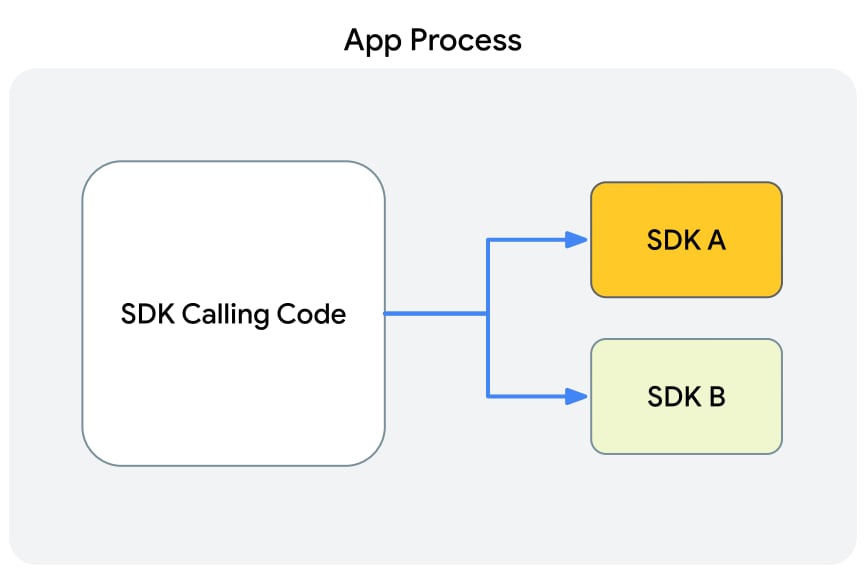
In the beginning there was the app. A developer said: I need more app candy and capability, but I don’t have the recipe, or ability to bake the cake all by myself. Solution providers filled the gap with delicious pre-coded goodies that app developers could simply conjure up in code without having to do very much work at all.

Wonderful?

Google’s illustration of how apps call functionality from SDKs that then lives within the app process

Sure.

But SDKs with extensive fingerprinting code were the cause of Apple rejecting app updates back in the early days of iOS 14.5. They’re one way some apps have been kicked off the App Store. And SDKs from rogue ad networks have been accused of driving both attribution fraud on billions of devices and orchestrating privacy-threatening data exfiltration … including snooping on communications in apps.

The modern app ecosystem couldn’t function without SDKs. They’re absolutely critical to the software that everyone who uses a smartphone or a tablet today depends on.

But they’re also a double-edged sword.

Google thinks it has a solution.

Go to your room right now (SDKs are getting grounded)

Because some SDKs have been very bad boys indeed — and you can bet we’re privy to less information on just how bad than Google itself — Google is grounding them.

Or, confining them to a sandbox.

An “execution environment,” if you will.

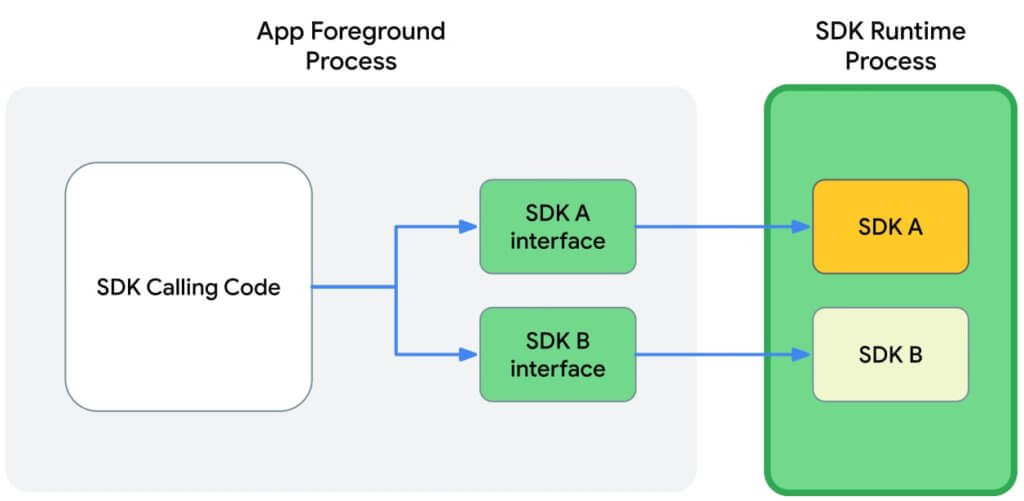
Inside this execution environment SDKs will have specific permissions and will execute them outside the main app process. In other words, SDKs will have much less implicit insight into what apps are doing and app developers will have full explicit control — or at least more control — over what an SDK sees and does.

How Google pictures adtech SDKs running in the Privacy Sandbox for Android

In Privacy Sandbox for Android, processes are isolated. 

SDKs live in a separate world. Adtech SDKs are no longer able to see and track app usage via persistent identifiers without developer knowledge and consent, and they’re also going to have a much more difficult time collecting perishable identifiers, or factors that can be summed up into a temporary identifier.

In addition, Google’s making it harder for SDKs to tamper with the functionality of other SDKs.

At the same time, however, Google is leaving room for SDKs to detect and prevent ad fraud and invalid traffic, where developers permit.

Google is your messenger now, SDKs

In the old model (today), apps and SDKs communicate unimpeded. They live, after all, in the same space and can chat whenever they want, however they want.

In the new world, which Google will provide in beta by the end of 2022, Google will build a “marshaling layer” which developers will call from within an app.

  1. App needs the SDK to do something.
  2. App code calls the marshaling layer and delivers a packet
  3. The marshaling layer delivers the request to the SDK (presumably checking it first for legitimacy)
  4. The SDK delivers an answer back to the marshaling service
  5. The marshaling layer completes the loop with the needed data or functionality for the app

An important point: this could be asynchronous. As Google has currently defined the process, the “SDK asynchronously satisfies the requests and responds using the callbacks.” That could potentially mess with functionality that requires instant response, which is a little confusing: pretty much everything in an app requires instant response as the app needs to present options for users and then deliver responses based on their decisions and input.

However, this is all pre-beta at the moment, so there’s no need to get too worried about that just yet.

Also: Google is building in functionality for SDK-to-SDK communication for scenarios like mediation and bidding. That’s a massive part of the adtech ecosystem on mobile with SDK networks that offer mediation services like the new titans of adtech: ironSource, Liftoff+Vungle, AppLovin, Digital Turbine, and Unity.  There will be the ability, Google is saying, for SDKs to offer ad impressions or run ad auctions by communicating with other SDKs, whether they’re inside or outside of the SDK runtime environment.

However, there’s clearly open questions here: notice the language Google uses like “should” and “investigation.”

“The coordinating SDK, RE [runtime-enabled] or not, should be able to access all RE and non-RE SDKs for normal operation. Rendering in this context is an active area of investigation.”

SDK makers: get ready to submit

In some sense, SDK makers have gotten a free pass. While apps themselves have to go through an App Store approval process on iOS or Google Play, SDKs have just kind of glided through on their customers’ or developers’ efforts.

Not any more, likely.

Given the unique sandboxed runtime environment SDKs will now exist in, Google is proposing that SDK makers submit their SDKs to Google Play and then become available for use by apps via Google Play itself. Google says this will ensure quality and consistency, streamline publication, and make minor SDK updates — that don’t require app code changes to function — quicker and cleaner.

Google’s ideas here are quite nebulous, however, and it’s not at this point saying explicitly that this is the future of distribution for all SDKs.

However, software developers can read the tea leaves as well as anyone else, and once this mechanism is in place and available, it’s not hard to imagine that it will become the preferred — and over time likely the mandatory — method of SDK distribution.

Much more to dig into

As I mentioned up top, there’s a lot more to dig into here. Sign up for updates on our blog newsletter to be notified when we publish more.

Also, I’m doing a live stream with Singular CEO Gadi Eliashiv on this topic on Thursday, February 24. Sign up for that here.

The future of iOS user acquisition: 21 questions and answers

How do you outperform your competitors in iOS user acquisition? It’s almost a year after Apple dropped iOS 14.5 like a bomb in the mobile marketing community and there is still a huge amount of uncertainty, confusion, and angst about how to operate in this new reality.

But you need clarity on a path forward.

So we recently gathered an all-star cast of mobile marketers to clear the fog and walked through all the issues.

  • Anthony Willis, Growth Manager @ Neonplay
  • Eddie Garabedian, Head of Marketing @ EA
  • Yusuf Barutcu, Director of Business Development @ MobileAction
  • Alexandre Dohrmann, Global Sales Engineering Manager @ Liftoff + Vungle
  • Eran Friedman, CTO & Co-founder Singular

We still had questions from the 1,500 mobile marketers who signed up for the webinar. Here they are, along with the answers.

Questions and answers for iOS user acquisition

1. Targeting
Q: Should we be targeting users that are pre-iOS 14.5 because we can track them?
A: No. First, there’s not enough of them, and second: the valuable users are almost invariably on the latest versions of Apple’s operating systems.

2. Facebook
Q: Are the panel guests seeing any meaningful improvements from Facebook in terms of tools for attribution, measurement and/or targeting on iOS?
A. Short answer: yes. Slightly longer answer: there’s still some way to go. With missing data due to privacy thresholds, getting better and more reliable modeling is critical.

3. ID or no ID?
Q. Do ID-related optimizations really apply to no ID? How different is ID UA performance vs. no ID?
A: Broadly yes and specifically no. Broadly yes because people are people, and if you have a significantly large sample of known people, either via IDFV or some internal identification like a sign-up or registration, you can cautiously generalize some aspects of what works to others.

However, there are problems.

First of all, the kinds of people who sign up or are known to you are different from those who haven’t in at least that aspect, and maybe more. You’ll need to make a judgment call on that yourself. And in terms of those who are making extra efforts to be anonymous by using ad blockers or VPNs or other technology, you can make a fairly safe bet that they’re not your average consumer.

4. ATT on Facebook?
Q: When using Facebook Ads to acquire users with SKAdnetwork is it necessary to trigger the iOS Tracking Transparency Prompt?
A: No. You don’t need to use the ATT prompt to rely on SKAdNetwork at all. Some Singular customers don’t use ATT at all: they simply decided not to ask consent from their customers and their users, not get the IDFA, and not attempt to track … and they can still use SKAN across our network.

5. Costs up 5X
Q: Regarding iOS 14+ campaign CPIs. We have seen a 5x increase in CPIs versus pre ATT for certain ad networks. Is that something you also see?
A: We saw a ton of that in the data that Singular has as well. The reality is, since you didn’t see all of the installs due to privacy thresholds, the ones you did see seemed to take up all your cost of advertising. So suddenly, if you had many small campaigns that didn’t hit enough volume, it was five times more expensive to get a user. The reality is: that it was more a function of the measurement changing than the world-changing.

6. Deep funnel optimization
Q: Do you have any intuition on comparing deep funnel event optimization in Apple Search Ads versus Facebook?
A: The big difference between Apple Search Ads and Facebook is that Facebook has to rely on SKAN while Apple Search Ads doesn’t. They don’t have SKAdNetwork. They provide you the actual users who came from Apple Search Ads. So it’s easier to look at the funnel events coming from Apple Search Ads versus Facebook where you’re limited to the measurement period of SKAdNetwork.

7. AAA campaigns on Facebook
Q: What are your experiences/results with AAA campaigns vs manual campaigns on Facebook acquisition?
A: Automated App Campaigns, or AAA, is the way to go, according to Anthony at Neonplay. They use it for all of their campaigns. Main reason: it just makes things so much easier. You can’t get as much detail on the ads themselves, but it makes the campaign optimization so much quicker.

8. Fingerprinting
Q: Lots of networks have claimed that the majority of their clients are still using p-matching (probabilistic matching … i.e., fingerprinting). Aren’t they openly breaking Apple’s rules?
A: Essentially yes. Apple has stated that fingerprinting is not OK, and they will probably make it impossible with Private Relay at some point.

9. Aggregated data
Q: What is “aggregated metadata” and can you give some specific examples?
A: Aggregated metadata is just a kind of fancy way of saying groups of users versus individual users. That means looking at more contextual, higher level, higher funnel data around things like source app, or combining data like IP address, device, language, device model type in bigger kinds of aggregate datasets to provide deeper insights into groups of users.

10. Optimizing for LTV
Q: How are you optimizing for LTV with such limited data?
A: This is definitely an issue with SKAdNetwork. There are two stages here.

The first thing is you need to make sure you get all the data, actually see the data that makes it past the privacy thresholds. So you want to make sure you get as many conversion values first before you start optimizing towards LTV. Now once you have good visibility there, the second thing is that you want to collect the signals from the limited data, the limited measurement periods, to calculate and predict the LTV. Here you need modeling using the signals that help you predict the lifetime value of the user. And clearly that needs to be refined over time.

11. CPE for UA
Q: What do you think about CPE (cost per engagement) as a UA model?
A: Alexandre says that he’s seen clients use specific events or conversion values, or intermediate events as retention goals for day 1, day 3, day 7, etc., as a placeholder for engagement metrics.

12. Testing changed under App Tracking Transparency?
Q: How has testing changed from before ATT?
A: Eddie from EA says that testing budgets have increased as an overall share of per percentage of spend, mainly on iOS. In prior years you could spend a small amount to see if something has promise, now you really have to be much more deliberate and bold with your budget decisions.

13. App Store badges
Q: Does including both app store badges in the creative help or hurt overall creative performance?
A: Yusuf from MobileAction says it doesn’t depend on only the badge that you’re using … there are many other instruments that you can play around to have better results with creative optimization. So I recommend testing more.

14. SKAN buckets for gaming apps
Q: Any advice on how to set up iOS SKAN buckets on your MMP for gaming apps?
A: Eran says there are definitely more optimized buckets to make sure you get the most accurate revenue and actually help you predict LTV. You need to really look at the model and the behavior of the users to see the most optimal distribution of the revenue buckets and use it.

Oh and … shameless plug …

Singular actually has some really cool new releases upcoming to help you find the ideal buckets for your revenue model.

15. App Store optimization and organic uplift
Q: What is the minimum daily spend for ads to increase ASO? Will the App Store notice that we are driving 500 installs per day from paid acquisition?
A: Yusuf answers: there is no definite upper or lower limit for you to get an impact on your app store’s optimization listings by spending money on Apple Search Ads.

The only metric that you should be concerned about is having better CTRs and CRs. Once you have a value over the average in the market, Apple’s algorithms detect that, and we see very good ramp-ups in organic rankings. So I wouldn’t say minimum installs: I would just recommend you focus on your conversion values first.

16. Privacy thresholds
Q: Do you have any model recommendations for small companies that can’t overcome privacy thresholds even for upper-funnel events?
A: Contact an expert at Singular for specific advice for specific apps and situations, but the general advice is this: run everything in a single campaign to maximize your ability to get data even with the privacy thresholds.

17. Organic uplift again
Q: Are my assumptions correct that relying purely on revenue and profit from paid installs is wrong, and that we should take into account extra organic installs which were caused by driving paid installs?
A: Eddie from EA says: absolutely, organic uplift is real and you should be looking at it. More often than not, we’ve sharpened the edge on paid attribution over the years. But this change in the industry is really asking us all to sort of look at all of the signals that are available in the market that are actually driving installs. So things like awareness, things like peer-to-peer sharing, all of those things really do play a role in overall growth. And so yes, the instincts are right.

18. UA on different networks
Q: Did user acquisition dollars move to networks like AppLovin, ironSource, and Vungle because they can do fingerprinting and Facebook can’t?
A: Not really. A bigger contributor to their success over the past year has been their massive drive to acquisition and aggregation of networks and tools for mobile growth.

Get more detail on this in the 2022 Singular ROI Index.

19. Best mobile attribution platform
Q: What attribution platform do you consider as the most reliable and accurate for iOS tracking?
A: Well …

20. Probabilistic data
Q: Do you see any risks about using MMP probabilistic data? Do you think it might go away?
A: For Singular, it’s only used in situations that are safe and approved. Apple’s position on this could change in the future (see our post on Private Relay for some insight) but we’re compliant and safe now, and will remain so.

21. Channel measurement and comparison
Q: What strategies have you employed to effectively measure performance between channels (web, iOS, Android) How do you decide where to shift budget?
A: This is what Singular was created to do. Use an MMP like Singular to track spend and ROAS between all campaigns and channels, and compare the results. You can also use Singular data in conjunction with timing techniques for incrementality testing if you wish.

So much more in the webinar

There is much more information in the full webinar, including hard data on what’s changing and how user acquisition on iOS is evolving in the era of ATT and SKAN.