Protected App Signals is a game changer for Privacy Sandbox targeting and ad relevance

When Google first unveiled Privacy Sandbox on Android, I was seriously underwhelmed by the targeting options. Topics API, it seemed to me, offered little better than contextual targeting. But Google has massively upgraded Protected Audiences API in Privacy Sandbox with, among other things, Protected App Signals. The result is greatly enhanced targeting capability that ad networks will be able to take advantage of and deliver for their mobile user acquisition customers.

And there’s probably more to come.

My goal here:
Unpack Protected App Signals and explore what this will offer for better on-device ad targeting in Privacy Sandbox.

Protected App Signals: what are we talking about here?

The key concept behind Protected App Signals will be familiar to everyone who knows even a little about Privacy Sandbox: the API stores clues and hints about what a person using an Android device might find interesting in the future, locally on-device.

Those hints and signals can be then used to make ads shown on that device more relevant to what its owner wants, does, or likes.

If it works, it’s the modern adtech gold mine: privacy-preserving ad relevance.

By design, Protected App Signals can only be accessed only by the adtech SDK that stored them. They’re created and stored on device to avoid data leakage, and they are encrypted to ensure privacy. When needed off-device for ad auctions, they are sent encrypted to a Trusted Execution Environment, but they’re only sent with enough data for targeting, not with data that reveals personally identifiable information.


Protected App Signals


Apps and SDKs cannot read or inspect these signals while on-device: there is no API for doing so. And the APIs that move Protected App Signals into Trusted Execution Environments for ad auctions are “designed to avoid leaking the presence of signals.” 

Signals? What kind of signals?

Pretty much anything you would have wanted to know from IDFA or you know now from GAID can be an app signal in Protected App Signals. Google’s documentation says signals like “app installs, first opens, user actions (in-game leveling, achievements), purchase activities, or time in-app” all count.

What we don’t know yet is how many app signals you can store.

The number of signals you can save is subject to storage quotas set by the system, and each adtech vendor gets allocated only a certain amount of storage space. Furthermore, app signals are stored on a first in, first out basis. Think of a dynamic queue that, once it’s full, every newly added item pushes the oldest item out.

Given that Protected App Signals looks to be a much more powerful targeting mechanism than Topics API, one of ad networks’ top priorities as Privacy Sandbox ramps up will be to determine the size of that buffer. It’s going to be fairly large, if the space that Google has allocated for campaign data is any indicator: we’re talking 64 bits for the Attribution Reporting API upper funnel event-level reports.

There’s a problem though.

The amount of space Privacy Sandbox will allocate for Protected App Signals will need to cover all of an ad network’s clients. If an SSP is in thousands of apps, that space could fill up fairly quickly, limiting targetability to niche and long-tail apps and games.

In addition, signals have a max TTL, or time to live. In other words, they are temporary, not permanent, and will eventually expire out of memory. How long it takes for that to happen is unknown outside of the Privacy Sandbox team, at least so far.

Interestingly, adtech companies with an on-device SDK can update as well as delete signals along with creating them. So theoretically, if certain signals turn out to be ineffective for targeting, an ad network could modify or just get rid of them, saving space in its queue.

Fresh signals can be sent to ad auctions as often as hourly. So while it’s not as quick as minutes after an add-to-cart action, for instance, it is relatively fast.

What about context and Protected App Signals?

Well, context still matters.

In ad auctions under Privacy Sandbox, buyers’ custom logic will process Protected App Signals along with contextual data provided by the publisher.

Some of that will be zero-party data that both buyers and sellers can infer, like date, time of day, day of the week. All of that can be combined with some degree of knowledge about the world, work days, holidays and vacation days, and global events like the Summer Olympics coming up in Paris this year. There’s additional zero-party data such as app placement information that will need to come along for mediation platforms, DSPs, or other adtech vendors to be able to bid on the ad slot and deliver the right kind of ad.

Some of it is likely to be first-party data such as rough location, language settings, some device data, the publisher app the ad slot is in, and so on. There may also be some rough contextual data from Topics API and other sources as well.

All in all, adtech companies will compete on how they store Protected App Signals, how many of them they store, what verticals of app they store them from, and how enriched the Privacy Sandbox signals can be.

And reporting?

We of course know that Privacy Sandbox reports postbacks via the Attribution Reporting API with significant amounts of upper-funnel campaign and delivery data along with much less engagement and conversion data, somewhat similar to Apple’s SKAdNetwork or the new AdAttributionKit (AAK).

But what about reporting specifically on the success/failure indicators in Protected App Signals? That remains to be determined, Google says:

“Auction participants receive applicable win reports and loss reports. We are exploring privacy-preserving mechanisms for including data for model training in the win report.”

Google is enhancing Privacy Sandbox steadily and regularly; stay tuned for more on this front. The goal is to be able to send event-level user data outside of trusted execution environments (TEEs) in a privacy-safe way. One option Google is using in the short term is adding noise to the data, but there may be better options available in the future.

So much better targeting than Topics API

When I first looked at Topics API in Privacy Sandbox, I said this:

“This is not granular at all. In fact, it’s very coarse-grained.

“We’re talking 350 topics initially, which is tiny. For reference, the IAB Taxonomy is 1500 terms, and even that is really, really limited compared to a somewhat-complete taxonomy which might have hundreds of thousands of terms.”

Just imagine sports. It needs hundreds of topics in and of itself: type of sport, league, anything around intent or purpose. Just buying ice hockey gear versus finding an app to check the Stanley Cup playoff scores would be challenging.”

But even with more topics, Topics API is contextual data. 

Clearly, Protected App Signals is much more powerful: it’s based on behavioral data, which is much more predictive of real-world activity. It’s something that adtech experts think is a gamechanger and are starting to get excited about. Obviously, we’re going to have to see what this looks like and how it works in the real world, but that testing is going on right now and it is starting to look pretty good.

Google is also updating Privacy Sandbox regularly:


protected app insights updates


That’s also good news: as an area of focus, Protected App Signals is likely to continue to get some attention and additional features.


How important is it to have your SDK on devices for Protected App Signals?

Only ad networks or MMPs with on-device SDKs can generate Protected App Signals, and only adtech companies that generated the Protected App Signals can access them. So it’s pretty critical to work with a vendor that has its SDK on-device.

Interestingly, Privacy Sandbox may significantly privilege companies with scale, specifically for these signals, because not only will ad networks with their SDKs in many apps see a lot of activity that can be used for Protected App Signals, they are the only ones who can move those signals into a trusted execution environment in order to conduct an auction.

That may make it harder for SSPs and other adtech companies with smaller SDK footprints to compete.

Webinar on Privacy Sandbox

Clearly, there’s a lot to learn about Privacy Sandbox. While we don’t know when it will be fully operational and implemented across all Google-maintained Android devices, it’s likely at some point in 2025.

How should you prepare? Start by attending this webinar.

What we’ll talk about:

  • What will life for a user acquisition team look like with Privacy Sandbox?
  • How much will marketers have to change in their workflows?
  • What levers you can use to drive incremental growth after launch
  • What do you need to do to be campaign-ready with network partners and MMPs?
  • How to start testing so you can hit the ground running?

See you there!

App Intents in iOS 18: on-device marketing, engagement, retention

Can App Intents in iOS 18 help grow your app? Magic 8 Ball says … all signs point to yes!

Typically, when we think of user acquisition or mobile app marketing, we think about advertising. We think about App Store Optimization. We think about influencers. Social marketing. Cross promotion. But we don’t really think too deeply about the on-device experience of an iPhone when people are NOT using our apps. 

That could be about to change, because the recently upgraded App Intents feature in iOS 18 offers multiple ways for you to find, serve, engage, and ultimately monetize people who use your app.


That’s interesting, because the hardest thing to do in mobile marketing is not to get someone to download and install your app. The hardest part of user acquisition is activation: getting those people to explore, understand, engage, and eventually come to regularly rely on your app.

App Intents can help with that most difficult part.

4 ways App Intents exposes your app

We’ve all been there on the user side. 

You download an app but get distracted. Days later you open the app and wonder why on earth you downloaded it in the first place. If you don’t delete it immediately, you run across it a week or a month later, open it just to see what the app actually is because the icon doesn’t really tell you anything useful, and wonder if you really need it on your phone.

From the user acquisition side this completely sucks.

You’ve won. You scored a goal, put the biscuit in the basket, drained the 3-pointer, and actually got a real live human being to do something: install your app. And you paid $3 or $5 or even $10 for the privilege.

But then … crickets.

No app opens.

No usage.

No engagement.

No opportunity for monetization.

However, while you’re suffering in this purgatory of app growth, App Intents could actually be helping you. As of iOS 18, App Intents will have 4 different ways to turn your app inside out. Or, in other words, to expose the data, capabilities, and benefits of your app throughout the entire device bouncing around in the pocket of your currently clueless new user.

Here’s how:

  1. Spotlight
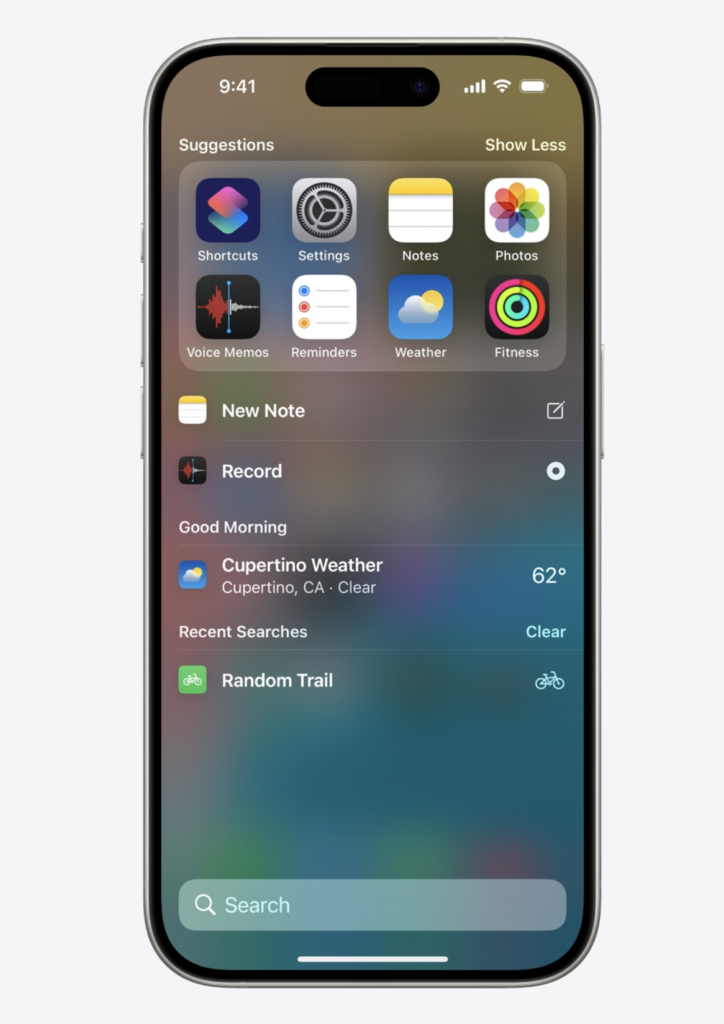
    Someone searches on their phone. Your app has the answers … and it pops up as a possible result. (And sometimes, Spotlight just guesses what people might want before they even start typing, meaning your app could just magically appear.)
  2. Siri
    We’re all starting to get used to having AI genies pop out of the magic boxes of glass and steel in our hands to answer our questions. While Siri has been somewhat intellectually challenged over the past few years, iOS 18 is upgrading its prefrontal cortex. More and more, people are going to start asking Siri for directions, food, help, information, products … everything. Which means you want Siri to point in your direction when the opportunity arises.
  3. Widgets
    Once people know what lives inside your app, sometimes they’ll want easy and instant, if not constant, access to it. That’s an on-screen widget.
  4. Control Center
    Finally, Control Center allows people to manage how their device acts and reacts … including your app functionality, if you wish.

The first 2 of these happen if you set up your app correctly, with App Intents. The second 2 happen if you take that first … and then people using your app take some additional action. 

All of them add opportunities to people to engage with your app, but the first 2 are the most critical for initial discovery.

This is on-device marketing, baby

One of the things that App Intents does is to make apps searchable. 

Things that are searchable are findable, and things that are findable can take advantage of serendipity. That’s the quality of not-quite-luck to make something good happen. One definition is “the faculty of making fortunate discoveries by accident.”

Guess what: when you want to grow an app, you like fortunate discoveries in your favor.

It’s not an accident, and it takes some work, but with a little investment in time App Intents could pay off significantly in the last mile of the user acquisition journey.

That looks like someone making an on-device search and, rather than having to go out of context or out to the web to answer their question or achieve their goal, they see your app — the same app they downloaded a couple of months ago and forgot about — show up.

A single tap and they’re in. 

Plus, thanks to Universal Links, they’re in at just the right place in your app that answers the precise question they have right at this very moment. That’s a second chance for you to make the case that your app just might deserve another opportunity to become a habit: part of their daily routine.

The best thing: it’s free.

In other words, this is a re-engagement opportunity that you don’t have to pay for via a remarketing or retargeting campaign.

App Intents: what’s all new

New features in iOS 18 include developer improvements to make this all much easier, but also:

  1. Spotlight integration
    Index the content and capabilities of your app, customize your attributes for higher-fidelity search, and set indexing priority, and people have better access to your app’s features via something done entirely outside of your app.
  2. Transferable API
    Sometimes people want something from your app for uses outside your app. Or things from other apps for use inside your app. Transferable API makes that simple via PDFs, images, or rich text.
  3. FileEntity API
    Imagine users being able to update data in your apps via Siri or Shortcuts. That’s what this API does.
  4. Deep linking via universal links
    Making your app’s capabilities shareable and linkable is great. Deep links into your app make it usable.

This is the last mile of user acquisition

What’s your D30 retention? Probably something like 5%? Maybe you’re on the higher side, with something around 10%? Or perhaps you are incredibly lucky and have an insane 56% retention rate

Whatever it is, I’m guessing it’s not as high as you’d like it to be.

App Intents offers some new tricks to try in iOS 18 to boost that number. Any time you do that, you cut your CAC and reduce wasted ad spend. Which means it’s probably worth a shot.

Free BI: MMP to Google Sheets now available for ALL Singular customers

If you’ve been dreaming about getting data straight from your MMP to Google Sheets, today is your lucky day. Your prayers have been answered and all your dreams have come true: you can now get automated streaming data updates straight from your MMP data in Singular to Google Sheets. 

Which is crazy helpful for start-ups, indies, and mid-market app publishers where you may not have a full-on geek squad BI team staffed with crack data scientists.

(Don’t tell anyone, but it’s also great for enterprise clients when someone on the team just wants these 3 things in a simple, easily accessible spreadsheet that they don’t have to submit a request in Monday or Jira for.)

Of course, it might be best of all for those who are just starting out on Singular’s free tier and need a simple, familiar place to check out all their user acquisition, LTV, and growth data. If that’s you, the BI you have is just 1 of 15 different hats you might wear every single day, so a simple, easy, and accessible BI-lite capability is just what the doctor ordered.

MMP to Google Sheets? Tell me more …

First, Singular collects all your data from all your partners, decodes it from SKAN conversion signals, enriches it with your first-party data, normalizes it, standardizes it, and combines top-funnel cost and delivery data with bottom-funnel actions, engagement, and conversion data.

Then …

… when you set up your data destinations, just hit Google Sheets.

Now just exactly the data you want for your specific needs will be automatically pushed to your Google Sheets regularly, automatically, updating as there’s fresh new data without any additional effort on your part.

And now you have the full power of Google Sheets to slice, dice, mince, and otherwise play with your data in a familiar spreadsheet tool. 

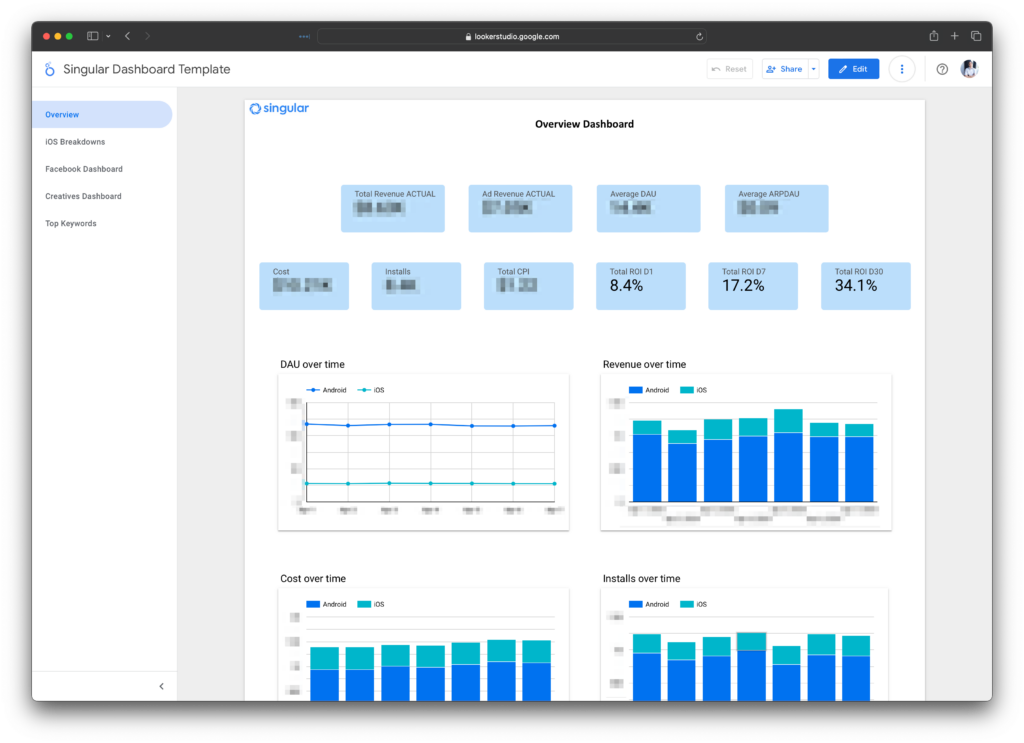
Which means you can create something like this, from one customer:


Add the power of Looker, if you like

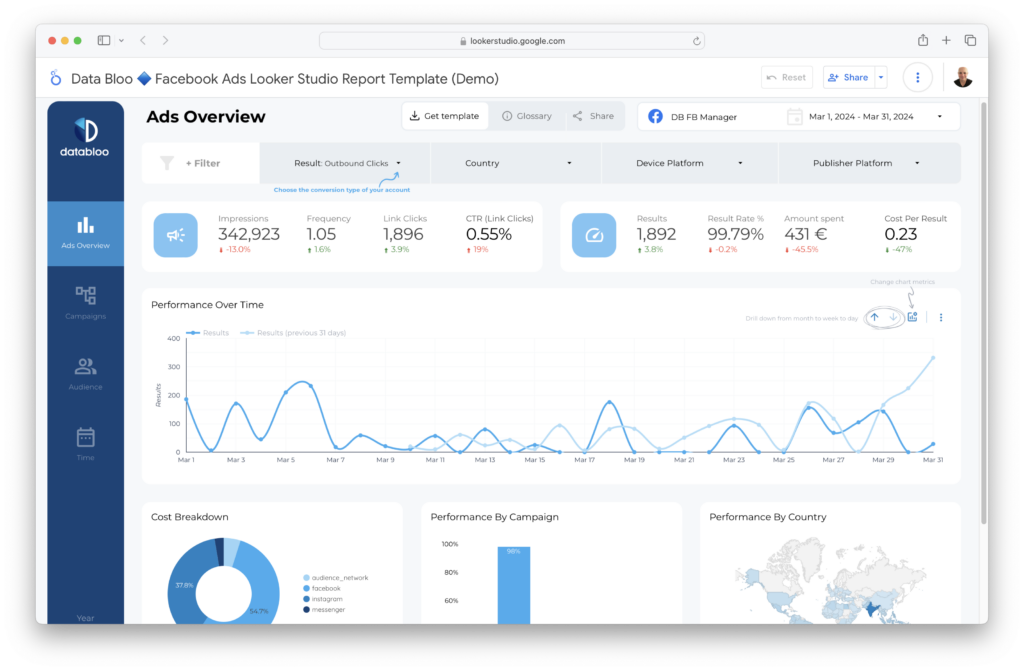
Some clients using this are adding another layer of BI-lite sophistication by connecting their Google Sheets to Looker and playing with their data even more.

One really useful option: using shared or for-purchase data visualization templates, like this one from Data Bloo:


MMP data to google sheets


High-end BI for everyone

Not everyone has 10 data scientists at their beck and call. Not everyone has a BI department, or even 1 analyst that they can task with building dashboards and visualizations.

And even if you do, they’re invariably too busy working on Big Important Projects™ for VPs and C-levels to give you just the data you need, in exactly the format you’d like, in precisely the format you prefer.

Which means that MMP to Google Sheets is a great self-serve buffet where you can prepare your own meal just the way you like it. That’s perfect for people who just want to track and monitor a few data points or those who have a very specific way they want to look at their performance marketing results. 

A couple more details: MMP to Google Sheets

You’ll need to authenticate your Google account, of course. Once you’ve selected the schema that you want to export, Singular will automatically begin filling it with data.

Google Sheets export will only work with aggregated data, not user-level data, and note that Google Sheets has limits on the number of rows they can contain. If you have too much data, Singular will automatically create a new Google Sheet.

Also, if you edit the data within Google Sheets, the next export will overwrite them.

Questions?

Google Sheets exports are available now for all Singular customers, including those who are using the free Singular tier.

Any questions? Grab some time with a Singular expert and we’d be happy to help.

Apple’s new AAK: AdAttributionKit and creative with Dataseat’s David Philippson

Dataseat CEO David Philippson and I got very lucky this week when chatting about Apple’s new AAK, or AppKit, or App AdAttribution framework, or SKAN 5 — whatever you want to call it — on the Growth Masterminds podcast this week.

The reason?

We recorded 90 minutes before the WWDC keynote, which didn’t mention AdAttributionKit, and a whole day before the WWDC session on AAK was released … and we didn’t get anything major completely wrong. Plus, we also highlighted a key addition with AAK: an updated sense of how Apple’s privacy-safe ad measurement framework deals with advertising creative placements.

As usual, click play and keep scrolling …

AAK: 3 modes of displaying and engaging with ads

In SKAdNetwork, there’s not really much concept of creative types at all: image, interstitial, playable, video, rewarded, you name it, they’re pretty much all treated in the same way.

“One of the widest criticisms of SKAN is that it doesn’t differentiate between a banner and a rewarded video, albeit the price is 20X the difference,” says Philippson.

Essentially, what SKAN knows is an impression for a view-through attribution and a click for — you guessed it — a click-through attribution. That datapoint is encoded in SKAN’s “fidelity type,” and what ad networks optimize for is a fidelity type of 1 (a click), because it’s higher in the attribution food chain and has a much longer measurement window (30 days versus just 1 day for an impression or view).

Under AdAttributionKit, there are still only the 2 modes of engagement, impressions and clicks.

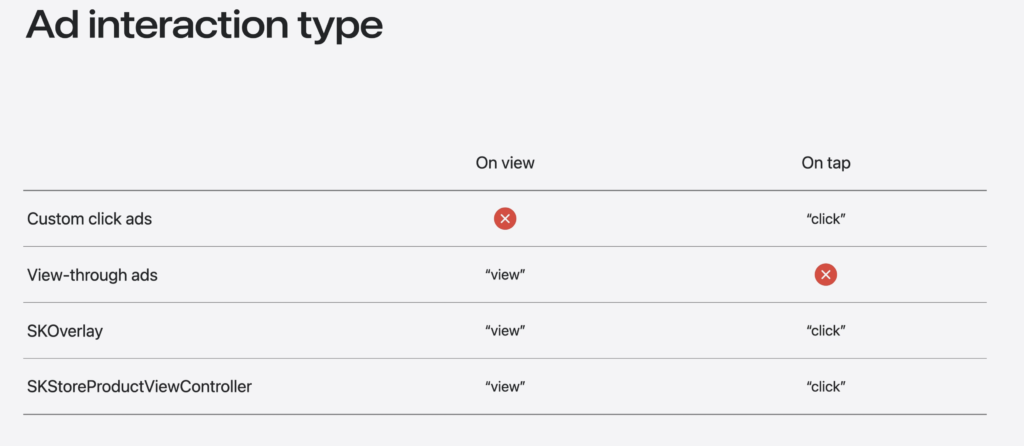
But AAK understands 3 different ways of displaying ads:

  1. Custom click ad
    Anything that’s clickable, such as a banner ad.
  2. View-through ad
    This is an ad that is not clickable, such as a video.
  3. Recommendation, or StoreKit ads
    Apple is calling SKOverlay, which is a clickable banner to install an app, and SKStoreProductViewController, which is a full-screen presentation of an app listing page on the iOS App Store, “recommendation” modalities.


AAK AdAttributionKit


The first, custom click ads, will click someone out of the publisher app into an app marketplace in order to download and install the advertised app. Note, Apple is calling it an app marketplace because it could be a third-party app store, but it could also be a link right into the iOS App Store as well.

Note that this custom click ad offers a deeplink right to the requested app, wherever it is.

Apple’s documentation specifies that “if the app specified by the impression’s advertised item ID isn’t installed, the system launches the app’s product page on the App Store or alternative marketplace according to the user’s preferences in Settings.” The deeplink, naturally, will be in Apple’s Universal Links format.

View-through ads are pretty obvious, and are not clickable, but will certainly be built into complex ad units by ad networks as they are today, with clickable components and/or end cards, including SKOverlay or SKStoreProductViewController.

Ultimately what most ad networks will use if they support AAK is the recommendation-style ads.

That’s simply because they are the most powerful: they can trigger an impression, which can lead to winning an attribution, and they can also trigger a click, which can also win an attribution but is more powerful thanks to its longer measurement window.

In some ways Apple is depreciating the value of the Custom Click ads, because showing a Custom Click ad doesn’t give you any view-through benefit, whereas the StoreKit-enabled ad units using either SKOverlay or SKStoreProductViewController will generate both views (on open) and clicks. This is a subtle privileging of the iOS App Store, because these high-value ad units won’t work with third-party app stores.

It’s also looking like a big update from SKAN, where the mere opening of SKOverlay registers a click … which is not really in line with user intentions. (Note, this is something I wrote about in February of 2023: Bad ads.)

Industry adoption: open ad ecosystem vs the giants

One of the things Singular CEO Gadi Eliashiv and CTO Eran Friedman discussed in our LinkedIn Live on AAK was industry adoption. If my temperature gauge is accurate, most of the industry sense right now seems to be that AdAttributionKit adoption is going to be slow at best and nonexistent at worst, simply based on the turtle-like pace of SKAN 4 adoption.

That might not be 100% fair.

After all, the industry has largely adopted SKAN 3, with the giants slow to move to the more complex SKAN 4. (Also, the giant self-attributing networks have basically all built their own modeled measurement capabilities which they are likely to prefer to Apple’s framework.) But AKK offers re-engagement measurement, one of the key missing ingredients in SKAN 4, and given that it is fully compatible with SKAdNetwork, doesn’t require much more work to support than SKAN 4.

(Which the big platforms already can support if they wish: 5-20% of their postbacks are SKAN 4 postbacks for testing, but it’s under their control to boost that to 50% or 100%.)

Also, there’s definitely a difference between the open ad ecosystem and the giants, Philippson says. The giants were largely against SKAN 4, he says, but not the rest of the mobile adtech ecosystem.

“I measure something else with SKAN 4 and that is every other publisher out there, every other programmatic publisher out there, and we’re at 70-80%,” Phillippson says. “So 70-80% of bids that we receive as a DSP are SKAN 4 compatible.”

That’s impressive, and it speaks to a potential divergence in the principle measurement methodology between the large walled garden platforms and the open ecosystem.

But adoption overall would also take a big leap, he says, if Apple found a way to ensure probabilistic attribution was impossible or at least much harder.

AAK, creative type, and the value of an ad

While there’s more built into AAK about the types of ad displays, that doesn’t really translate to another big ask from the industry about creative types and attribution windows under SKAN.

As Zynga user acquisition head Nebosa Radovic wrote recently on Medium: 

“Fidelity Type 1 ads leveraging SKOverlay have a 30-day window. They don’t distinguish high CPM, highly intrusive placements like a non-skippable 30s (rewarded) video or a skippable 15s video. If an ad is SKOverlay rendered, it defaults to a 30-day window.”

(Fidelity type is another way of saying click or view, with a click worth more than a view. AAK doesn’t have fidelity type, but it will have what Apple is calling “ad-interaction-type.” We don’t have all the details yet in the documentation on how “ad-interaction-type” will work.)

Similarly, as Philippson put it in our Growth Masterminds episode, “SKAN would attribute an install equally to a 320 x 50 banner to what it does a 30-second rewarded video that is paid a lot of money for.”

Radovic asked for more options. Where SKAN has fidelity type 0 for views and fidelity type 1 for clicks,  Radovic wants options for different kinds of creative:

  • Preloads
  • Static banners
  • Long videos
  • Shorter videos
  • Skippable videos

There’s no mention of anything like that so far in AAK, but I do know via a source that Apple plans all further attribution innovation on AdAttributionKit, not SKAdNetwork.

So perhaps we’ll see more there, eventually, in “ad-interaction-type.”

Much more in the full podcast

Check out the full episode for much more, including a discussion on modeling and what kinds of measurement and attribution are needed by different levels of the marketing organization.

Find Growth Masterminds wherever podcasts are published, or on our YouTube page.

AdAttributionKit: the new SKAdNetwork?

Hello AdAttributionKit. Goodbye SKAdNetwork?

At WWDC 2024 this morning, Apple unveiled more details about AdAttributionKit, which is likely the new SKAdNetwork. That remains to be fully seen, and SKAdNetwork is still here, but basically AAK (or AdKit?) is SKAdNetwork with a few updates and, likely, a longer lifespan.

Why do I say that?

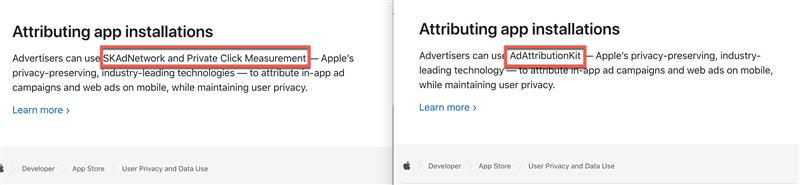
In the WWDC 2024 session, Apple says that AdAttributionKit has “full interoperability with SKAdNetwork.” For more information on SKAdNetwork, Apple refers viewers to the WWDC presentation of SKAN 4 from 2022. Furthermore, Sara Camden, the head of product marketing at InMobi, told me this morning that Apple’s main attribution landing page that covered SKAN as well as Private Click Measurement has been entirely overhauled to focus on AdAttributionKit … and any mention of SKAN 5 coming soon is gone.

Here’s the before in December 2023, and the after, from January 2024:


AdAttributionKit new SKAN


I rest my case …

(Oh, while you’re reading this, please join our LinkedIn Live about AdAttributionKit.)

AdAttributionKit: the big new stuff

There are 5 major differences between AdAttributionKit and SKAdNetwork.

  1. Built for multiple app stores
    The biggest and most significant change is that AdAttributionKit is built for a world of multiple app stores, thanks to the EU and its Digital Markets Act. That means there is now a “marketplace identifier” which will indicate which app marketplace an app install came from.
  2. Re-engagement support is here at last
    One of the most requested features for SKAdNetwork was re-engagement support, which has now arrived. The “conversion-type” field in AdAttributionKit can have 1 of 3 different values: download, redownload, and re-engagement.
  3. Support for multiple creative types
    In SKAdNetwork, an ad is an ad is an ad. AdAttributionKit, however, has explicit differentiation in both displaying ads and attributing conversion by creative type: clickable custom creative, view-through ads like videos, and what Apple is calling “recommendations,” which are in-app app listing features like SKOverlay (a small view into an app listing page) and SKStoreProductViewController (a larger, full-screen version of the app listing page). And Apple’s developer overview of AdAttributionKit says that it supports “multiple advertising formats, including static images, videos, audio, and interactive ads.”
  4. Hello deeplinks
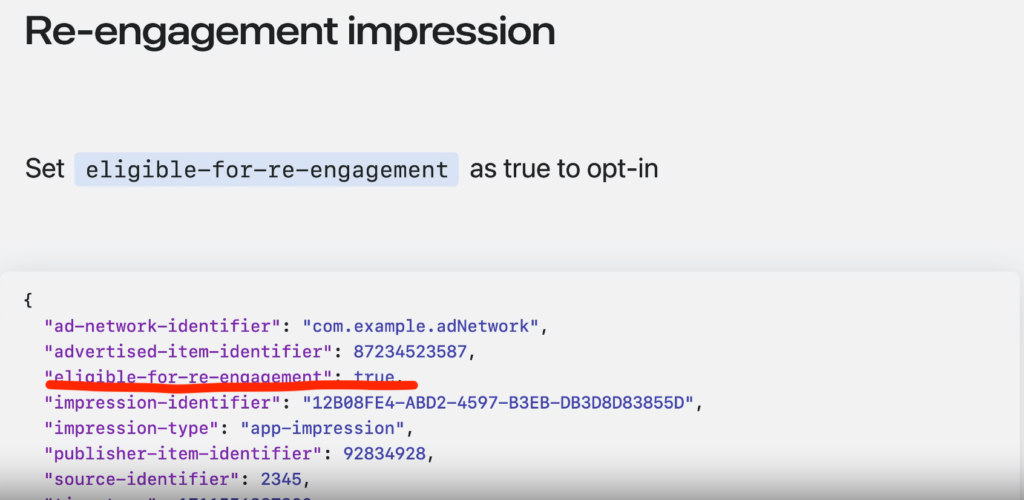
    If advertisers add opt into re-engagement, they can add the “eligible-for-re-engagement” flag to the code that displays an ad. If that flag is present and AdAttributionKit detects that the app being advertised is already installed, it can open the app to a specific screen using universal links
  5. Developer mode
    It’s generally hard to test SKAdNetwork because the postback delays and long conversion windows make developers wait to find out if what they did worked. Now Apple will allow you set developer mode for AdAttributionKit, which will remove the time randomization, shorten conversion windows, and send postbacks much quicker.

There’s more, but those are the big new announcements in AdAttributionKit.

All about re-engagement in AAK

Losing re-engagement campaigns was a massive blow in SKAdNetwork that wasn’t solved in SKAN 4, but was promised for SKAN 5. Now Apple is delivering it in AdAttributionKit.

Here’s the flow:

  1. Ad networks add the “eligible-for-re-engagement” parameter, telling AdAttributionKit to consider the ad for re-engagement conversions if the app being advertised is already installed
  2. If a person who sees the re-engagement ad taps on it, AAK will open the advertised app to a specific screen using a universal link
    1. Note: an ad can have the re-engagement parameter and still work perfectly fine as an app install ad in cases where the advertised app is not yet installed
  3. As AdAttributionKit opens the app via the universal link, the ad network appends a query parameter to the link to show that the app was opened as a direct result of a re-engagement ad
  4. AdAttributionKit will send postbacks to the ad network (and optionally the advertiser), but they’re a bit different than install postbacks
    1. Re-engagement postbacks will contain a “conversion-type” field with the value “re-engagement”
    2. AdAttributionKit only supports click interactions for re-engagement; not view-through interactions
    3. Conversion values for re-engagement can be updated separately from installation postbacks
    4. The first conversion value update must occur within 48 hours of the re-engagement event
  5. Given that AdAttributionKit sends postbacks for re-engagement campaigns and appends a special AdAttributionKitReengagementOpen parameter to the deep link that opens the app, there’s going to be good measurement capability
re-engagement in AdAttributionKit

AdAttributionKit vs SKAdNetwork

Apple’s WWDC session made it clear: AAK has full interoperability with SKAdNetwork. That means it operates essentially like SKAdNetwork with all the SKAN features you’ve come to know over the past few years:

  • SKAN 4’s 3 separate postbacks 
  • Coarse and fine conversion values
  • Crowd Anonymity governing how much data AAK releases
  • SKAN 4’s conversion value locking
  • Random delays before postbacks get fired
  • Source Identifiers
  • App ID, now called Advertised item ID

The key difference, as noted in the AdAttributionKit documentation, is that “AdAttributionKit works with both the App Store and alternative app marketplaces, while SKAdNetwork works specifically with the App Store.”

It is possible to pick 1 framework and stick with it, but it is also possible to use both concurrently, Apple says. 

However, 1 framework will win.

“If an app has both AdAttributionKit and SKAdNetwork impressions, the system sorts both of them and decides the winner. Only 1 impression can win for a conversion, whether it came from AdAttributionKit or SKAdNetwork.”

“The system,” as Apple says, will pick the most recently tapped ad for the attribution. If there were no click-through engagements, the most recently viewed ad wins. In cases where the actions in AdAttributionKit and SKAdNetwork are both clicks or both views, the most recent action wins.

Ultimately, however, if you have the choice of implementing either 1, you’re naturally going to pick AdAttributionKit because it has wider applicability: it will work with all app marketplaces.

True, that’s not super-relevant right now because there currently are no significant alternative app stores for iOS, but presumably that will change over time.

In addition, it seems likely that if there are updates to Apple’s attribution frameworks, they’ll happen for AdAttributionKit, not SKAdNetwork.

What about Web AdAttributionKit?

Today’s WWDC session focused mostly on App AdAttributionKit, and the same is true about the existing documentation.

But there is also a Web AdAttributionKit.

There isn’t a lot about Web AdAttributionKit yet, apparently from bits and pieces in Apple developer documentation for other things, like this documentation for UIKit.

What Apple does say there is not super-definite, calling Web AdAttributionKit a “proposed standard.”

“Web AdAttributionKit (formerly known as Private Click Measurement, or PCM) is a proposed web standard that allows external websites to measure when external links, such as ads, result in a conversion.”

That’s likely due to PCM’s genesis as a project in WebKit, the open source codebase and organization behind Apple’s Safari browser. It is likely to be cleaned up in the future.

Much more to come: check out our LinkedIn Live

We’ll be hosting a LinkedIn Live on AdAttributionKit this coming Thursday, June 13. At that event, Singular CEO Gadi Eliashiv and CTO Eran Friedman will discuss what AdAttributionKit means, how it will work, what will happen with SKAdNetwork, and much more.


AdAttributionKit LinkedIn Live


Join us by clicking this link and RSVPing!

Why removing items from a wishlist is a strong buying signal: AI agents and app retention

Should you have AI agents assigned to every single app user? Imagine the results if you could do exactly that …

Imagine smart AI agents able to suggest new options, notice when a user or player seems confused, help when there’s a problem, suggest the next best thing, offer the right coupons or discounts or packages for each and every person, all in real-time. It’d be almost like having a real person there with people in your app, offering suggestions and, in some cases, trying to close a sale.

Is this just a dream? Or is there some substance to the promise?

I chatted with Shaun Wheeler, a data scientist at Aampe. Hit play, keep scrolling …

Maximizing engagement via AI agents

Everyone wants to maximize engagement, retention, and monetization, right? That’s why tools like Braze, CleverTap, and Aampe, among others, are so popular. Old-school segmentation and audiences are blunt instruments, crude, slow, and unable to react in realtime to user activity.

“Every user on an app is an individual,” says Wheeler. 

“They have a different background, different preferences, different patterns, different things are going to motivate them or activate them, and there isn’t any data science team big enough that they could actually tease out all those individual patterns. Even if there was, there’s no CRM team big enough that they could actually act on all those patterns.”

So a rules-based approach triggering specific messages when players or customers do specific things, he says, is substandard.

Even worse, there’s a lack of learning.

If User A does Action B, what does that mean for the future? Does it mean they’re actually really primed for Offer C? And if so, what’s the next logical projection? A rules-and-trigger system doesn’t really know anything or store anything: it just reacts. All the “knowledge” resides in human heads that are setting up the rules and triggers and messages.

And that just can’t comprehend all the myriad of paths users/customers/players might take, or how previous behavior will impact current action. Plus, it can’t react in realtime and build new models of what people do as things change.

AI agents can do better.

AI agents, not quite like Agent Smith

AI agents sounded a lot more sci-fi before ChatGPT, Wheeler says. Ultimately, they’re pretty simple.

“An agent is just a type of AI that can receive guardrails and then it can act autonomously within those guardrails.”

The ideal dataset isn’t just 5 things you’ve instrumented in your app, or even 50. It can be everything: the entire datastream of what people do in an app.

“We work with apps that easily have over 400 different types of instrumented events,” he says. “That’s all information, like every button click, every page visited, whether it’s on a site or an app, and you can take all of that into the agent and process it in a way that the agent can then make decisions about.”

The goal is to be able to understand how likely each step — and each stimulus the app provides in response — is likely to move a player or user or customer towards a certain goal. How the app responds and what channel it uses, whether an in-app notification, a push notification, an email, or even potentially some modification of how the app acts or what it looks like, is on the table. That’s exactly what AI agents are intended to do.

“All of those kinds of behavioral decisions are normally made by a CRM team,” Wheeler says. “Many of them can actually be made very reasonably by an AI agent that’s properly structured.”

Better engagement through smart messaging

One example?

I play a game multiple times daily that opens with 3 pop-up messages that are essentially the same, with minor variations, every single day. Some of them seem to be power-ups for parts of the game that I don’t play and don’t understand. Others are announcements and events in such tiny text I’d have to work hard to figure out what they’re about.

All of them tend to train me to close pop-ups instantly. 

They also put roadblocks between me and what I opened the game to do: have fun. 

I’ve often thought a metric that app developers and marketers should track is “taps to X.”

  • For games that’s taps to fun: how many taps does it take before a player is enjoying a game?
  • For retail that’s taps to buy: how many taps does it take to purchase something?
  • For fintech that’s maybe taps to pay or taps to deposit

Knowing that number — and any changes up or down — is more important than I think most app publishers admit to themselves. And whenever that number goes up, that’s a massive disincentive to use an app.

The point is: messages seem free because you can just pop them up on your app, or click to send them out via push notifications.

In reality, they’re extremely expensive. They can cost engagement. They can cost retention. They can cost monetization.

So ensuring that each message is a smart message that is both relevant and timely, and is sent to someone who will be happy to see it — or at least OK with seeing it — is critical to generating better app engagement. AI agents could notice that I’m not paying attention to these pop-up messages, and either stop sending them, or just sending 1 that is actually relevant to what I do in the game.

Saying less but achieving more

One example of doing exactly this is a nursing app that Wheeler mentioned that was using SMS to message nurses about shift availability. 

SMS is good because most of us see most of our text messages, as opposed to in-app messages that we only see when we’re in the app, or push notifications that may or may not be enabled, and even if enabled are not tremendously effective in all cases. But SMS can be expensive, so messaging this way is literally financially costly rather than just metaphorically costly as mentioned above. 

The result of smarter messaging getting better engagement?

“We increased their activation by, I think if I remember correctly, it was 9%, but we reduced their SMS volume by 75%,” says Wheeler. “That was savings in the hundreds of thousands per year.”

How? 

The AI agents recognized nurses who never took weekend shifts, or never took night shifts, or followed other patterns of behavior. (I personally know a nurse who only takes night shifts.) That personal knowledge — almost like a human who deeply knows the individual people using the app — made all the difference.

Sometimes AI is smarter than us

Ask a human about a potential customer removing an item from their wishlist, and you’d probably get an answer that it’s likely a bad sign: a sale won’t happen here.

That’s actually opposite to reality, and the AI agents discovered it by following the data.

Wheeler talks about what he learned from a retail app:

“There were several events that you wouldn’t be surprised led to a higher probability of a purchase. Adding to cart is a very strong signal, but one that really surprised us was the wishlist. It wasn’t adding to wishlist … it was removing from wishlist that made them more likely to purchase.”

What was happening is that people who are adding to their wishlists are just curating products, sort of like a Pinterest board. But removing from a wishlist often means that you’re actively making decisions about what you might be just about to buy, right now or in the near future.

Much more in the full podcast

Check out the full Growth Masterminds episode for much more.
You can subscribe to Growth Masterminds on any podcast platform you prefer, or watch the videos by subscribing to our YouTube channel.

Your first million app users: 15 keys for mobile growth

How do you get your first million app users? It’s hard: you generally have to start from scratch, especially if you’re an indie or a startup. If you’re a massive app publisher, you probably have big user acquisition budgets and you can cross-promote, but you’re still starting something that needs to sprout and grow and stand on its own legs eventually.

So it’s tough for everyone.

We recently held a webinar with global experts on user acquisition and mobile app growth focusing on the cold start, setting up your tech stack, defining your app’s unique value and audiences, and generating massive and profitable user acquisition.

In this post, I’m going to share the very best of their insight from that webinar …

The mobile app growth experts

First, let’s meet them:

  • Sara El Bachri, Founder @ SHAMSCO
    I called Sara the gunslinger of growth in a recent Growth Masterminds podcast episode. She’s a former Gameloft UA manager and has also published the Mobile Gaming Growth Masterclass. Check her out in this Growth Masterminds podcast.
  • Hannah Parvaz, Founder @ Aperture
    Hannah is a former app marketer of the year, and she’s also the marketer behind the phrase “becoming the most interesting person in the room” which has been stolen endlessly by apps and brands around the world. Hannah is also one of my favorite guests on Growth Masterminds … check out her episode here …
  • Guy Galin, Senior User Acquisition and Ad Monetization Specialist @ Mad Brain Games
    Guy is a big lover of the word AND. He does both UA and ad monetization, which is hard but incredibly useful to combine, and he loves both data and creative.
  • Beth Berger, VP of Americas @ Moloco
    Beth is a former VP and GM at Bumble and a former Googler building adtech solutions. She’s also been the CEO of a software company and an investor, and has an MBA from Stanford in product strategy.
  • Egor Ershov, Senior Growth Partner @ Unity
    Egor was formerly in marketing at Starbucks. He’s the host of WN Events for the games industry, and focuses on gaming UA and monetization via video networks and incentive channels.
  • Mike Gadd, Director of customer service for EMEA @ Singular
    Mike is a super smart mobile measurement expert with a long history in tech startups. He helps growing and enterprise clients every day with complex SKAN and growth challenges and — fun fact — was a rock climbing instructor about 15 years ago.

Getting your first million app users: starting out

What do you need to do right away when starting a new app? What are some of the very first growth-oriented tasks for marketers?

1. Know your customer or user or player

No, we’re not talking fintech anti-money-laundering tech (KYC) right now. We’re talking deeply knowing who your users, players, or buyers are (or, if you’re totally new, will be).

If you don’t know them — or don’t have any users yet — go where you think they might be:

“The first thing that I always want to do is have an understanding of who the customer is,” says Parvaz. “So the first thing I’m doing is finding out who could be a potential customer … what is the problem that I am trying to solve, or what’s the problem I think I’m trying to solve with my products? I go into Facebook groups, I go into Reddit communities, I go in, find these people somehow and I start talking to them to understand, in their language, what are their jobs to be done.”

(Check out “jobs to be done” in Harvard Business Review if you haven’t come across that phrase yet.)

2. Know your app

Your app might be fintech and you don’t do finance. It might be a game and you don’t play games. Or it might be a pet-sitting service and you don’t have a dog.

Doesn’t matter.

Use your app.

“So you actually must use your app, or you must play your game,” says Ershov. “Whether you like gaming or not, or whether the app is designed for you or not, you gotta deeply understand what kind of product you are promoting. I’m stressing this because I’ve seen so many cases where the marketers would actually ignore this aspect and there was a huge disconnect between the product and marketing.”

3. Test the first-time user experience

There are so many steps involved in getting an engaged, profitable user. 

There’s awareness via whatever channel, a decision to install — probably after multiple touches — a decision to open your app, and then multiple very fast decisions about what people see, how it conforms to expectations, and what conclusions they draw from it.

“I would highly recommend testing the first time user experience to see how you match up against the competition,” says Galin.

You spend a lot of time and money getting people in the front door. You should deeply understand how they feel when they step inside. Doing so will increase your conversion rate between app opens and engaged, retained users, decreasing your cost per customer acquisition.

(Note: this is why product and marketing have to be deeply connected.)

4. Set clear KPIs

You know you’re making progress on a hike when the signposts telling you how far away your destination is start counting down the miles.

You need the same sort of milestones in your app growth journey.

“You have to set clear KPIs in terms of all the parties that are involved, whether it’s monetization, management, marketing, just to understand where you’re going through,” says Galin.

Setting, measuring, and regularly monitoring those KPIs will show you when you start seeing improvement in usage, retention monetization, and cost of acquisition. Or it will show the opposite, which is just as important.

Getting your first million app users: making progress

OK. You have made some progress. You have some users. And you might even have some cash.

Now what?

5. Don’t go on an ad-buying spree immediately

Start slow.

The worst thing you can do when you start getting a little bit of cash in hand is to blow it right away. The biggest problem right now: you don’t yet know how to scale growth profitably for this specific app, product, or service.

“Even if you have some cash, I don’t think you should spend and test quickly,” says El Bachri. “I think you should start really slow until you gather at least the first cohorts, the first numbers, in order to kind of get a baseline of performance.”

If you spend, spend carefully.

Look at those first cohorts. How many become long-term engaged users? What’s indicative of users with good retention? How do people behave in your app? What does monetization look like.

Until you know those things (and you never know them as well as you really want to know them) tread carefully. Remember: fools rush in where angels fear to tread.

(Including angel investors!)

6. Understand your growth loop

Knowing your app is 1 thing. Knowing how your app will grow is another.

Is it going to be viral? Will it be word of mouth? Does the product get better when more people use it? Will early adopters actually take the trouble and risk of inviting others? Is it all going to be about paid advertising? 

In short: what will the main mechanic of growth be?

“There isn’t a 1 size fits all answer to this, but the only real answer is you have to understand how your product works,” says Parvaz. “You have to have a deep understanding of what is an appropriate way to build a growth loop.”

This will vary wildly depending on vertical, and by the specific things you do in your app. One thing that worked in the early growth stages for an app Parvaz was consulting on was as simple and manual as sending out very personal emails to prospective customers.

Test and observe until you’re sure you’ve hit something good. But try to test fast.

7. Optimize conversion rates with excellent ASO

It’s generally a good idea to have good ASO. But not just for the reason most people think.

Most people think good ASO is about getting more organic app installs from people who just happen to be whiling away hours of their lives browsing Google Play or the App Store. 

And yeah, that’s great and good magic when you can get it, but it’s rare.

Good ASO is much more about conversion rate optimization.

“Focus on app store optimization, keyword optimization specifically on Google Play” says El Bachri. “On iOS, it’s a little bit more difficult to move the needle just with keyword optimization. But on Google Play, I’ve seen there are some cool tricks you can do with keyword optimization.”

Keyword optimization buys you visibility for those who might be searching for things like your app.

Good ASO buys you cheaper installs thanks to higher conversion rates. And this can have a super-dramatic impact on your true CPI:


aso for cro


“By improving your store page appeal, you basically make sure you need to serve less ads for people to download your app, right?” says El Bachri. “So you’re optimizing the funnel.”

8. Deep dive on push notifications

Most people mail it in on push notifications.

That’s a mistake, says Galin:

“I would highly recommend to get a deeper understanding of how the push notification strategy is working for you and really dive deep in and see if you can get insights on what’s working, what hours, what kind of messaging,” he says. “Is it better on iOS, is it better on Android … usually with most of the companies it’s pretty much automated and nobody pays attention.”

Paying attention, however, pays off. A lot of daily active users in Mad Brain Games come back thanks to push notifications.

9. Appoint a high-LTV account manager

Set up someone whose main responsibility is to understand and advocate for high-LTV users. They are the lifeblood of your monetization, which means they’re critical to the success of your game and your studio.

One example of their utility from Galin: situations where something in the app breaks that payers and high-value users require. Getting it fixed quickly, and communicating with them, are critical.

10. Identify the habit point

When your app becomes a habit, you know you’ve got a retained user. And that’s where you have the opportunity to monetize.

“At the nightlife app I mentioned earlier, to become activated, it required having three redemptions at bars on different nights,” Parvaz says. “And so we measured that by looking at, okay, we create a funnel and then what’s the drop off after these?”

“So from install to first redemption, huge drop off, second first to second, smaller, second to third, smaller. And then third to fourth was like a 2% drop off. After that, people were continuing.”

The key questions to answer: how are people becoming activated? Where is that activation point? What triggers it? How deep is it in the funnel? And can you find sufficient numbers of new users who go through that entire process to acquire the habit and become activated?

Getting your first million app users: tech stack

What do you need in your tech stack as you start to grow?

Good news: not as much as you might think.

11. Get an MMP (for free)

Most MMPs have a free tier and Singular is no different: go to the Singular home page, click on Start Free, and you’re in. (Or just scroll to the top of this page!)

“Definitely start simple,” says Gadd. “The majority of the basics you should be able to cover with an MMP: you can get a report builder, you can do attribution, you can pull your campaign data into one place, you’ve got revenue tracking, retention tracking, creative optimization … all of that is within one free product that you can use.”

There’s an ETL, so if you just want to push your data into a Google spreadsheet, you can start there too.

This is actually a critical point in the app growth journey, says Ershov:

“Please get yourself an MMP and your future self will thank you later so much. And you’re gonna remember this moment when you got an MMP and your life changed … it’s really vital.”

12. Outsource your tech to your ad partners

Maybe when you’re a massive publisher with multiple huge games you’ll run many parts of your BI and ML in-house. But that doesn’t mean your journey to get there has to be completely bare bones.

Moloco’s Beth Berger talks about a company that captured the data from their soft-launch campaigns to pre-train machine learning models for their growth campaigns. As it turns out, it was Scopely and Monopoly Go, both hugely successful, but even they leaned on others for some help.

“Whether it’s a Moloco or whether it’s Meta and Google or any other advertising tool, they can take that data and do a lot of the heavy lifting for you,” she says.

That’s hugely helpful, especially in the beginning.

13. Use your tech to analyze your cohorts

Future user acquisition and monetization will depend on acquiring the right kind of users. So analyze your current cohorts to learn more about what they should look like.

“Those early signs that you are able to track via an MMP tell you a lot about what the progression will be for that specific group of users,” Galin says. “That’s extremely important in terms of understanding how the users behave, how the product behaves, and how you match up versus your competition.”

14. Build your custom KPIs

Everyone knows the standard KPIs … the CPI and the ROAS and the LTV, the CTR and the CVR, and they matter, along with many other metrics.

But you’ll also have some custom KPIs just for your app, because you’re starting to learn what really drives long-term success:

“What are those key events that are happening that you can then optimize towards and try and drive your growth that way?” says Gadd. “So we see a lot of customers who are optimizing towards registration or free trial events, or it can depend on the industry.”

Fintech or social casinos? Probably first deposit.

On-demand? First order.

Social or messaging? First friend add, creation, or message received.

“If you’re building an SKAdNetwork strategy for iOS measurement, understanding the impact of those metrics is really, really useful,” Gadd says.

15. Start working on data governance

It might be boring, but it’s an absolute necessity. Data governance will save you so much trouble when you start segmenting and analyzing your data.

“Even if it’s just a Google sheet and you have a column for each of the dimensions you’re tracking, you add a dimension into each of those columns, and then that builds your campaign name or your creative name,” says Gadd.

“That’s a way that you can get started, but there are also other sorts of tools out there, and sometimes free tools as well that you can use. There’s one in Singular, and it basically builds your campaign and creative name for you and then automatically turns them into dimensions … being able to do that is really, really critical for being able to segment the data effectively. And if you are, if you’re focusing on testing and growing, that’s gonna be really, really important.”

So much more in the full webinar

There really is so much more in the full webinar. 
I strongly recommend jumping over to the full webinar, which is available on-demand, and taking a few minutes to absorb it all in context.

Stop A/B testing creative now? AI is killing traditional testing …

Should you stop A/B testing creative right now? Maybe not, but in a few years you will probably look back on A/B testing as the stone age of creative optimization and wonder, like a kid looking at an old-fashioned rotary phone, did we actually do all of that manual labor?

Hit play, keep reading …

Mom knows best?

It’s kind of the ultimate parental slap-down. 

At a family dinner a few years ago, Ellad Kushnir Matarasso, now director of growth at Alison.ai, told his parents about the A/B testing he was doing to optimize the $100 million annual ad spend he was in charge of at his agency. 

His parents — both computer scientists — looked at him a little funny and asked, sort of like you asking your old-school uncle why he’s still using a point-and-shoot camera, why he was still doing A/B testing when there were much better options.

So much for the $100 million flex.

Fast-forward to today, and Ellad doesn’t have to hang his head anymore at family events.

AI knows best (no more A/B testing)

“When I joined Alison I was really excited to join a company that really introduces a new approach to creative testing,” he told me in a recent Growth Masterminds podcast

“So rather than having to constantly produce new concepts, new iterations to feed the beast, and then having to test them against each other, which means a lot of time and money spent on both production as well as media budgets, Alison takes a different approach.”

“So essentially once we connect to the advertiser’s ad account, our algorithms go frame by frame to automatically identify each and every element that appears within those creatives — it can be anything from colors, text, sound, characters, facial expressions, literally anything that you can think of that might appear inside those creatives …  and once we’ve mapped out all those elements, we then cross-reference them with the performance data from the campaign, which means that for whichever KPI or metric that you’re optimizing for, we can inform you which creative elements are making the most impact on performance.”

It sounds good. 

It sounds super high-tech.

And it sounds like AI, which it is. 

In fact, the company uses over 15 different AI engines to identify everything inside your creative elements and, instead of using one-off A/B tests, essentially runs a massively multivariate test on pretty much every minute component of your creative to see what correlates with success.

If it sounds a lot like something Google and the other major social and ad platforms might be doing in the background as they use AI to slice up your creative elements in a blender and then Dr. Frankenstein them back together in a million combinations to see what works best, well, there’s a reason for that.

Both of the biggest digital ad platforms on the planet actually use Alison.ai.

“I’ll tell you a secret: all these platforms that you mentioned are using Alison,” Kushnir Matarasso says. “So essentially they themselves understand that sure, their algorithm helps you kind of throw in certain stuff into the mix and come up with something new. But in most cases there is a big gap between what they can achieve in terms of performance.”

So where’s the human now?

Using AI doesn’t mean the human goes away, Ellad says.

“We’re big believers in human creativity. Our objective is to amplify that using our technology.”

Part of the reason for that is even when AI knows something, it doesn’t know that it knows it, or know why it knows it. So humans can identify when something just doesn’t quite make sense, or a particular combination of creative elements would reflect poorly on the brand. 

Plus, creating a brand vision and building an expression of that which can really connect to a target audience of potential users/players/customers is still really on the carbon units in the marketing department, as opposed to their digital partners.

Creative is critically important, whether you’re using A/B testing or not

Creative is responsible for up to 89% of the success of your campaigns, according to a 2017 Nielsen study that Ellad cited. 

That’s huge.

Get creative wrong, and you basically just tossed your ad dollars right into a dumpster and set them on fire. And in an era of increasing signal loss, what creative can bring to your campaign success is even more important.

Should you look for best practices?

Interestingly, “we don’t really believe in best practices,” Kushnir Matarasso says.

That makes sense from a lot of perspectives: what works for 1 brand in 1 ad network in 1 point in time could be completely different from what works for you. But the other way it makes sense is that best practices are a way of averaging out things that don’t fail spectacularly. 

Modern creative optimization is about finding unicorns that succeed spectacularly.

And while best practices can help you not lose your job … they probably won’t find your next superstar ad either.

That said, one of the biggest mistakes Matarasso sees is overusing creative: using what worked in Google on TikTok, or what worked on Snap in AppLovin. Rather, you need to have a specific approach for each platform, he says.

Does this mean you should never do A/B testing?

Probably not.

But it does mean that the days of A/B testing’s full utility are probably more behind us than in front of us. Marketers will have to do what they have to do, based on the technology they have available to them and the data they can access.

But ultimately, if you can get more insight into all the minutiae of what’s working and what’s not working — and if you’re able to actually use that data intelligently — you probably want it.

Much more in the full podcast

Check it out on our podcast home page, where you can also find links to subscribe to Growth Masterminds on our YouTube page or on your favorite podcast platform.

GDPR in the USA? Here’s what the American Privacy Rights Act of 2024 says

Will the United States soon have its own national version of Europe’s GDPR? In April of this year, a Democrat and a Republican introduced the American Privacy Rights Act of 2024, which could eventually be America’s first-ever national privacy bill

While 17 states have created their own consumer privacy laws, led by California in 2022 with CCPA, there isn’t yet a national framework for US citizen’s digital privacy. In contrast, Europe’s General Data Protection Regulation was adopted in 2016 and became an enforceable law in 2018.

If indeed the American Privacy Rights Act of 2024 proceeds and becomes law, it will result in significant changes for how American companies — including mobile app and game companies — do business. So what I’d like to do in this post is summarize the American Privacy Rights Act of 2024, compare it to GDPR, and discuss what this means for mobile marketers.

At the same time, let’s be honest: it’s an election cycle, and bipartisan legislation is unbelievably hard to pass right now in the existing hyper-partisan US government. It’s more likely that the APRA will serve as the framework for a future law than get passed on its own right now … although it’s probably more likely to pass if the Democrats prevail in the next election.

States with privacy laws: lots!

Let’s start here: At least 17 states have privacy legislation on the books, although for some states the laws won’t become effective until 2026. The American Privacy Rights Act of 2024 isn’t appearing out of a vacuum. 

In general, US states have focused on consumer rights (access to personal information held by companies, correction and deletion of that data, the ability to opt-out, and the ability to transfer information to other service providers). Business obligations include getting consent, providing transparency, and minimizing the amount of data collected. 

In addition, businesses are required to both implement security measures to safeguard consumer data as well as notify users or customers in the event of a security breach.

Here are the states with privacy legislation, in chronological order of when they adopted or are adopting consumer digital privacy laws:

  1. California: California Consumer Privacy Act (CCPA), January 1, 2020
    1. Also: California Privacy Rights Act (CPRA), January 1, 2023
  2. Virginia: Virginia Consumer Data Protection Act (VCDPA), January 1, 2023
  3. Colorado: Colorado Privacy Act (CPA), July 1, 2023
  4. Connecticut: Connecticut Data Privacy Act (CTDPA), July 1, 2023
  5. Utah: Utah Consumer Privacy Act (UCPA), December 31, 2023
  6. Texas: Texas Data Privacy and Security Act, July 1, 2024
  7. Florida: Florida Digital Bill of Rights, July 1, 2024
  8. Oregon: Oregon Consumer Privacy Act, July 1, 2024
  9. Montana: Montana Consumer Data Protection Act, October 1, 2024
  10. Delaware: Delaware Personal Data Privacy Act, January 1, 2025
  11. New Hampshire: New Hampshire Data Privacy Law, January 1, 2025
  12. Iowa: Iowa Consumer Data Protection Act, January 1, 2025
  13. New Jersey: New Jersey Data Privacy Act, January 15, 2025
  14. Tennessee: Tennessee Information Protection Act, July 1, 2025
  15. Maryland: Maryland Online Data Privacy Act, October 1, 2025
  16. Indiana: Indiana Consumer Data Protection Act, January 1, 2026
  17. Kentucky: Kentucky Consumer Data Protection Act, January 1, 2026

As is pretty obvious by the dates, there’s been a rush of legislation in many states since 2023 to get a digital privacy protection law on the books. That digital privacy push is continuing, as at least 8 other states have new privacy laws pending or under consideration:

  1. Hawaii
  2. Massachusetts
  3. New York
  4. Pennsylvania
  5. Washington
  6. Wisconsin
  7. Minnesota
  8. Ohio

At this accelerating rate, pretty much every state will have a digital privacy act in the next few years. The challenge, of course, is that if there are minor differences between them all — and how could there not be — businesses will need to support a patchwork of legislation depending on where their users, players, or customers are.

Which … doesn’t sound efficient.

That’s one of the reasons for the American Privacy Rights Act of 2024: a universal country-wide law about digital privacy.

The American Privacy Rights Act of 2024

What is the American Privacy Rights Act of 2024 all about? Well, if you’re familiar with GDPR, there’s a lot that’s similar. The APRA is a bill to “establish national consumer data privacy rights and set standards for data security.” 

If passed, it will have a significant impact on how marketers, adtech companies, and large digital platforms like the GAFAM or FAANG conglomerates collect data. It will also impact what data they collect, how they process that data, and whether they can run targeted, personalized advertising campaigns.

Here are some of the key focus points of the APRA:

  1. National data privacy standard
    APRA, if signed into law, would establish a uniform national privacy standard that supersedes the existing patchwork of state laws. It is also likely to provide stronger protections than most current state laws, and perhaps all.
  2. Consumer rights
    The American Privacy Rights Act grants consumers rights like the ability to access, correct, delete, and export their data, as well as to prevent the sale of their data. Americans would also be able to opt out of data processing and targeted advertising.
  3. Consent for sensitive data
    APRA requires companies to obtain explicit consent before transferring sensitive data to third parties.
  4. Data minimization
    As we see in GDPR and many state laws, companies would be required to limit data collection, storage, and usage to what is necessary to provide their services. In other words, no more free-for-all.
  5. Enforcement mechanisms
    APRA provides individuals the right to sue for damages if their privacy rights are violated and prevents mandatory arbitration in significant privacy harm cases. It also authorizes enforcement by the Federal Trade Commission (FTC), state attorneys general, and private individuals.
  6. Protection against discrimination
    The American Privacy Rights Act prohibits the use of personal information for discriminatory purposes and mandates annual reviews of algorithms to prevent harm, including discrimination. How these annual rev
  7. Data security obligations
    Companies must implement strong data security measures to protect against data breaches and identity theft, and have a data security officer.
  8. Small business exemption
    Small businesses that do not sell personal information are exempt from the Act’s requirements​. A “small business” is one with less than $40 million annual revenue and process data for less than 200,000 people.
  9. Algorithm exemptions
    The American Privacy Rights Act would give consumers the right to opt out of the use of algorithms for “consequential decisions” like which consumers should be offered credit, health care, insurance, employment, and so on.

Data the APRA covers includes personally identifiable data and sensitive covered data, such as health information, biometrics, genetic information, financial data, precise location data, login credentials, private photos and recordings, and more. It does not include ”de-identified data, employee data, publicly available information, inferences made from multiple sources of publicly available information.”

Large businesses will have special obligations, and they are defined as companies with $250 million or more in annual revenue and who process data for more than 5 million people (or 15 million smartphones, or sensitive data for just 200,000 people). Large businesses will need to file annual certifications of their internal controls with the FTC.

How similar is the American Privacy Rights Act to GDPR?

Ultimately, the 2 pieces of legislation have very similar goals.

Very obvious in both are a focus on individual rights and allowing individuals with rights to access, correct, delete, and export their data. In other words: you own your data. Both APRA and GDPR have the concept of consent, and both require explicit consent for processing sensitive personal data.

Both also require companies to engage in data minimization, requiring that companies limit data collection to what is necessary for specific purposes, and both provide for significant enforcement mechanisms, including penalties for non-compliance.

There are also some key differences:

GDPR applies to all organizations processing the personal data of EU citizens, regardless of the organization’s location. (Which is why it required significant investment by American companies as well as European.) APRA focuses on creating a uniform standard within the U.S.

The opt-out rights are slightly different, as well:

  • GDPR allows individuals to opt out of data processing for direct marketing at any time
  • The American Privacy Rights Act includes the right to opt out of targeted advertising

In addition, APRA specifically prevents mandatory arbitration in cases of significant privacy harm, a feature not explicitly addressed in GDPR. And the American Privacy Rights Act mandates annual reviews of algorithms for discriminatory impacts, which is more specific than to GDPR’s general requirements for data impact assessments.

Also, GDPR has an understanding of data controllers versus data processors, which don’t appear in the APRA. Instead, the American Privacy Rights Act has a concept of a data broker, which would appear to be a significantly different thing. The APRA does recognize that processing data is something that needs to happen, however, and does allow for “processing covered data solely for measuring or reporting advertising, marketing, or media performance, reach, or frequency.”

This bill would need to go through multiple iterations before becoming actual law; it’s possible that some of these definitions and use cases will be further spelled out if it proceeds.

Impact on digital marketers and user acquisition pros?

Clearly, a law like the American Privacy Rights Act would accelerate adoption of privacy frameworks like Apple’s SKAdNetwork and Google’s Privacy Sandbox. 

The APRA might also necessitate them.

Privacy Sandbox, in particular, includes privacy-safe mechanisms for targeting, audiences, and retargeting, and those could be not just nice to have but absolutely necessary in a world in which people can opt out of targeted advertising. Currently, “targeted advertising” is defined in the bill as something that happens in the presence of a unique persistent identifier, which seems to indicate that the American Privacy Rights Act views old-school IDFA or GAID behavioral targeting as potentially problematic, but not necessarily anonymized targeting.

Even so, however, Americans would have much more control over the collection, use, and storage of their data, and adtech in general would need to adapt.

Third-party data would be the most vulnerable, as usual.

Ultimately, it’s likely that any impacts of the APRA are already kind of “priced in” to the cost of doing data-driven performance marketing today, especially for companies also doing business in Europe, and adopting Apple’s SKAN, and working on Google’s Privacy Sandbox. Also, for companies using data processors like Singular, pretty much everything they’ll need in terms of transparency and delete-ability is already available.

Also as usual?

First-party data is king, queen, and the prime minister all in one. Knowing your users, players, or customers deeply, and developing a strong relationship of trust with them, will be ever-more-critical in the years to come.

Protected Audiences API in Privacy Sandbox: a better Topics API?

Privacy Sandbox on Android won’t be fully available in general availability until the end of 2024 or perhaps early 2025. But Google’s done a huge amount of work on integrations and testing, and also significantly expanded the functionality of multiple parts of Privacy Sandbox: especially the Protected Audiences API.

First launched as FLEDGE, the Protected Audiences API was all about retargeting or remarketing. 

Not any more.

“The  Protected Audiences API started off its life as an API focused around solving the retargeting problem, but it’s become a lot more than that,” says Luckey Harpley, a product manager at Remerge. “And I think remarketing will in the end be a small part of it.”

Hit play and keep scrolling …

Privacy Sandbox 2024: faster on mobile, slower on web

Privacy Sandbox on the web and Privacy Sandbox on mobile are so similar in so many ways it’s tempting to link them together. 

(OK, fine, full confession: it’s a big temptation for me.)

But it’s important to remind ourselves that web infrastructure for internet marketing precedes mobile infrastructure for marketing by at least a decade. And that means there’s probably a lot more legacy web marketing infrastructure that is deeply dependent on cookies, including third-party cookies, than existing mobile marketing infrastructure that is completely dependent on the GAID.

(Plus, the web just moves slower than mobile, and that includes technological progress.)

As such, Google’s being extremely cautious about its plans to deprecate the third-party cookie. 

Third-party cookie deprecation was originally scheduled to be some time in 2022, believe it or not. After 2 earlier delays, we now know that 2024 won’t be the year either: Google recently announced that “we will not complete third-party cookie deprecation during the second half of Q4.”

Careful readers will note with a knowing grin that “we will not deprecate cookies in 2024” is not a promise to do it in early 2025. Or in late 2025. Or — frankly — even in 2026.

But true to form, mobile is probably going to move faster.

So despite the fact that the APIs for both web and Android are pretty much the same, the timeframes aren’t connected, says Singular’s head of Privacy Sandbox Omri Gal:

“It appears that it’s going to be slower on the web and probably faster on the device … third party cookies are currently here to stay, but the GAID … I don’t see it going away by the end of this year. But it looks like it’s pretty close in the early part of next year. And this is why it’s important to test.”

So the smart money is on the GAID going away early in 2025, while the third-party cookie might very well last another 6 to 18 months.

Protected Audiences API: all growed up now?

Back in the original Privacy Sandbox days, Topics API was about targeting and Protected Audiences API was about retargeting.

That’s not quite true anymore. 

“I think of the Protected Audiences API more like a protected auction API, and it has two parts,” says Harpley. “There’s the Protected Audiences side that it started with, and as of last December, we have the Protected App Signals side of it.”

Protected App Signals is kind of like Topics API in some senses. But rather than Topics API’s broad interest areas that are user-defined by what apps a person has engaged with, Protected App Signals is about specific actions like app installs, first opens, in-game level achievements, purchase activities, or time in app, Google says in the documentation.

That data is stored and made available to run a “protected auction” in which adtech companies can match up those signals with ad candidates, contextual information and choose a winning ad.

All of this happens on-device in a trusted execution environment, preserving privacy while providing ad relevance.

“The Protected Audiences part is for solving that remarketing problem that allows buyers to join users on the device that they might be interested in remarketing to,” Harpley says. “On the Protected App Signals side, it allows buyers or marketers to save signals about the user on the device, and use those signals at a later date for user acquisition campaigns. So we have these Protected Audiences and we have Protected App Signals both going through this protected auction system to solve both the retargeting and the user acquisition use case.”

In other words, Protected Audiences API is now a full meal deal.

And actually, for targeting, Protected App Signals is more powerful than Topics API, which almost seems redundant now.

(Learn more about Protected App Signals here.)

Testing Privacy Sandbox: Singular and Remerge

Singular has a new SDK with Privacy Sandbox built in, Gal says, which customers and partners have access to and have been testing since this summer. Remerge has a test app, implemented the new SDK, and is running campaigns with a mutual customer.

Google has rolled out Privacy Sandbox to about 1% of Android devices, so there are devices in the wild for testing purposes.

Here’s the flow, generally speaking:

  1. An event occurs on-device (let’s say “add to cart”)
  2. Singular receives it
  3. Singular passes it to the adtech platforms (in this case Remerge)
  4. Remerge will not have the GAID, but will respond do the device, letting it know that is interested
  5. The device will trigger an ad auction
  6. The device will choose a winning ad in the auction
  7. An ad will be shown

What’s super interesting is the juxtaposition of today and tomorrow, and how Privacy Sandbox turns existing adtech logic upside down:

  • Today, devices know their GAID but not much else in terms of ads
  • Adtech companies know a lot about that GAID: where it’s been, what it’s doing, what apps it uses, and so on
  • In the future, devices won’t have a GAID, and much of that contextual and behavioral information will live on-device
  • In particular, all the information that can track users across apps and connect that activity in a single database won’t be available as it is now 

“The device keeps its clothes on, right? And everything stays hidden,” says Harpley.

Intra-app tracking won’t be possible anymore, he says. There’s still data about what people are doing, and there’s still ways to target valuable users, but the next of that data has moved.

“The device knows if this is a valuable user, and then when we see the user again on the publisher side, we won’t be able to connect it, but that device knows that it should show this information to the publisher,” he says.

So what do you need to do to prepare?

Read the docs and test, says Gal. 

And you’ll be able to do that side-by-side with your existing GAID-based workflow, which is ideal for testing.

“We plan to release a production SDK, Android version, which includes Privacy Sandbox APIs,” Gal says. “So our aim is to have clients with our SDK, with their production app that they are running as usual with GAID live and available, and we’ll be able to test all those APIs on these devices while we still have the regular measurement and regular flows. And that will be the best way to both check and validate that we’re doing everything right and all the dots are connected.”

One thing to note, just as we found with SKAN on iOS … there’s gonna be some growing pains.

So it’s best to start early.

Check out the full Growth Masterminds episode

Check out the full Growth Masterminds episode on YouTube, or on any audio platform that you choose.

Just search “Growth Masterminds” on your podcast platform of choice.