Content
Stay up to date on the latest happenings in digital marketing
Summary
-
Leverage AI for Data Insights: Marketing professionals can now utilize Google’s Gemini and other LLM integrations via Singular’s MCP to effortlessly query their campaign and performance data using natural language, eliminating the need for SQL or complex dashboards. This provides immediate access to valuable insights for decision-making.
-
Focus on Clean Data: Singular prioritizes the accuracy and reliability of data, implementing a rigorous 7-step approach to minimize LLM hallucinations. Marketers should ensure that the data they access and utilize remains valid and trustworthy, which is essential for effective campaign strategies.
-
Explore New Market Opportunities: As more AI engines are integrated with Singular, marketers are encouraged to experiment with various LLMs (like Claude and ChatGPT) to discover new insights and optimize their marketing spend, ensuring they adjust strategies based on real-time data trends and performance metrics.
Hello Gemini! Singular’s MCP integration now supports Google’s Gemini so you can talk to your data via yet another LLM.
If AI is eating marketing, Singular’s making sure you get a seat at the dinner table.
And … that you get some good munchies.
By which we mean, of course, accurate, clean, and trustworthy data straight from the most accurate possible source: your own data in our databases and dashboards.
This week Gemini CLI joined ChatGPT, Claude, Cursor, and Visual Studio Copilot as part of our growing set of LLM integrations. So you can now talk to your Singular data directly through Gemini, asking natural-language questions and getting instant, AI-powered answers: no SQL, no dashboards, no building queries, no waiting on your BI team.
Just you, your voice, and your data.
So … what can you ask Gemini?
Just connect Gemini-CLI and you can ask pretty much anything you want:
- What are my top performing campaigns?
- What creatives are working on TikTok?
- Show me a chart of installs by geo over the last 90 days.
- What CPI trends are you seeing month-over-month by ad network?
- Where should I be spending more?
- Where should I be spending less?
- And much, much more …
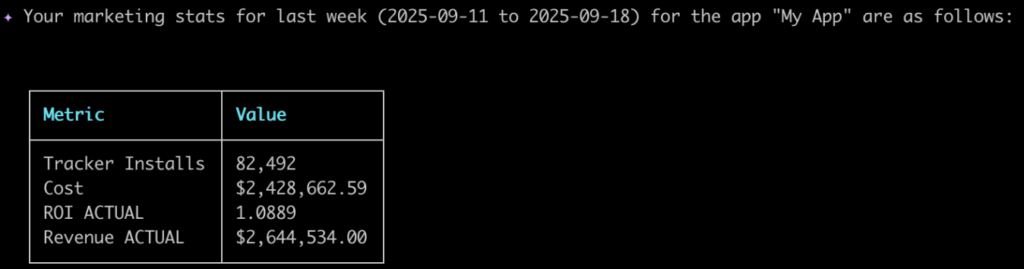
Gemini will instantly give you insights, tables, and visualizations, all generated from your very own Singular data.
- Gemini brings the brain
- Singular brings the data
- You get the insights
Even better, we don’t just support Gemini. There are now so many options for which AI engine you’d like to plug into your growth data …
Gemini’s got company
Gemini joins a growing list of LLMs that Singular supports, thanks to our standard, private, and safe MCP integrations.
So far, they include:
- Claude by Anthropic
Singular was the first MMP to enable direct access to your data via an LLM when we released support for Claude in June. - ChatGPT by OpenAI
ChatGPT followed Claude, which makes sense because Anthropic invented the MCP integration protocol that all the LLMs are now using. - Cursor by Anysphere
We didn’t really announce it, because it’s pretty geeky, but if your devs want to play with code, AI, and data, Cursor is a really good way. - Visual Studio Copilot (GitHub Copilot)
We didn’t really announce this one, so I’m slapping my own wrist here again, but the reason was the same: it’s super geeky for developers who want to build cool stuff with their data (and AI). - ChatGPT – Developer Mode
This is still in beta, but yeah, developers like options. So this is available too … - NEW: Gemini CLI
Right now, Gemini supports MCP integrations to Gemini-CLI, which is the Gemini-CLI desktop app. The browser-based Gemini doesn’t support MCP integrations just yet, but we’ll connect it as soon as it does.
And yes, more are on the way … including super-cool agentic AI engines that will support even more advanced use cases and complex jobs.
OK … how do you connect Gemini?
Short version: get all the details from our Singular MCP doc in our Help Center.
Slightly longer version:
- Install the Gemini CLI app
- Configure Gemini to use Singular MCP
- Run Gemini in your terminal app
- Authenticate with your Singular account when prompted
- Give Gemini the right permissions
When all that’s done (and yeah, get the exact details from the Help Center) you can easily ask Gemini for any of the data you want. Take a look here to see what people are commonly using our MCP LLM integrations for.
Worried about LLM hallucinations?
So are we.
Good, clear, accurate data is critical to what we do, because it’s critical to what you do.
That’s why we’ve invested heavily in ensuring that hallucinations are as rare as possible when you use the Singular MCP. We literally have a 7-step approach to forcing any LLM accessing your Singular data to do its best work, simply, strictly, observably … without making stuff up.
This makes bad data extremely rare.
That said: you still need to be aware, and ensure that Gemini’s answers — or answers from any LLM you connect to your Singular data — pass the sniff test.
Not a Singular client yet? Can’t access this Gemini goodness?
Well, let’s fix that.
You can start for free, and you can also book a product demo to get a sneak peek under the engine that powers growth from some of the best and biggest brands on the planet.
All it takes is a click.
See you soon!